> For the complete documentation index, see [llms.txt](https://help.glpi-project.org/llms.txt). Markdown versions of documentation pages are available by appending `.md` to page URLs; this page is available as [Markdown](https://help.glpi-project.org/doc-plugins/plugin-glpi-network/anonymize.md).
# Anonymize
## Requirements (self-hosted)
| GLPI Version | Minimum PHP | Recommended |
| ------------ | ----------- | ----------- |
| 11.0.x | 8.2 | 8.4 |
| 12.0.X | 8.3 | 8.5 |
{% hint style="info" %}
A [GLPI Network BASIC](https://services.glpi-network.com/#offers) subscription (or higher) is required. This plugin is also available for all GLPI Network [Cloud instances](https://glpi-network.cloud).
{% endhint %}
***
## Install the plugin
* Go to the marketplace. Download and install the "\[Anonymize]{.title-ref}" plugin.
***
## Choice of profile
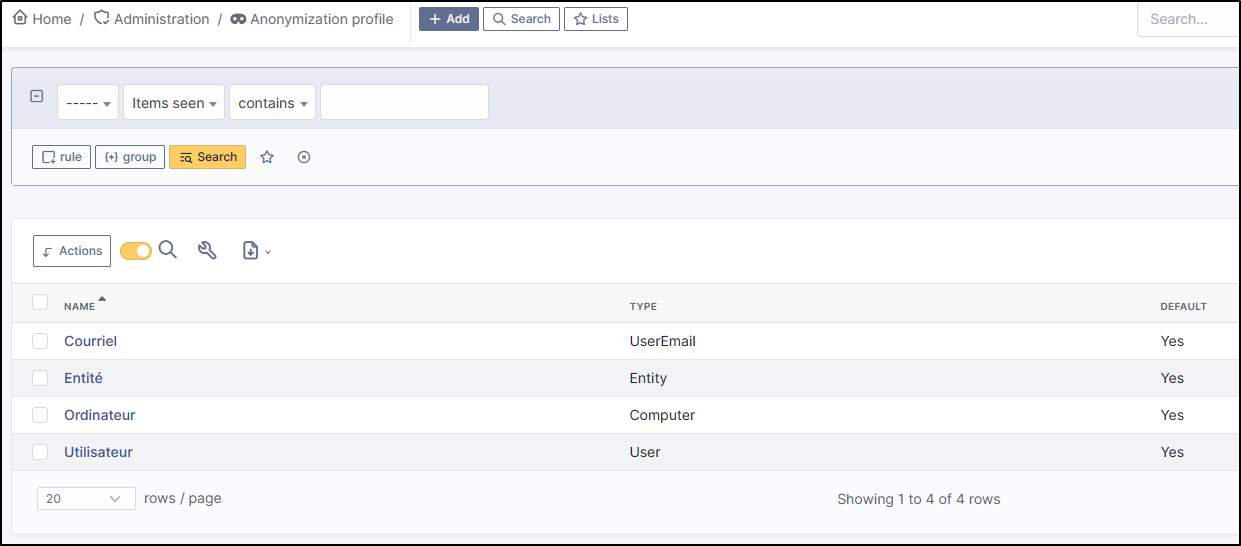
Anonymisation works by profile. There are 4 profiles already created. When you select a profile, a certain amount of data is already set. They can, of course, be modified.
* Go to **Administration** > **Anonymization profile** and select the profile best suited to your needs:
The 4 profiles you will find are :
* Email
* Entity
* Computer
* User profile
***
## Anonymisable data per profile (predefined)
Each profile has an element assigned to it. You will need to define the value of each attribute that it will be able to anonymise (or not)
### Email
Email field
* users\_id
* is\_default
* email
### Entity
Entity fields
* name
* entities\_id
* comment
* level
* sons\_cache
* ancestors\_cache
* address
* postcode
* town
* state
* country
* website
* phonenumber
* fax
* email
* admin\_email
* admin\_email\_name
* from\_email
* from\_email\_name
* noreply\_email
* noreply\_email\_name
* replyto\_email
* replyto\_email\_name
* notification\_subject\_tag
* ldap\_dn
* tag
* authldaps\_id
* mail\_domain
* entity\_ldapfilter
* mailing\_signature
* cartridges\_alert\_repeat
* consumables\_alert\_repeat
* use\_licenses\_alert
* send\_licenses\_alert\_before\_delay
* use\_certificates\_alert
* send\_certificates\_alert\_before\_delay
* certificates\_alert\_repeat\_interval
* use\_contracts\_alert
* send\_contracts\_alert\_before\_delay
* use\_infocoms\_alert
* send\_infocoms\_alert\_before\_delay
* use\_reservations\_alert
* use\_domains\_alert
* send\_domains\_alert\_close\_expiries\_delay
* send\_domains\_alert\_expired\_delay
* autoclose\_delay
* autopurge\_delay
* notclosed\_delay
* calendars\_strategy
* calendars\_id
* auto\_assign\_mode
* tickettype
* max\_closedate
* inquest\_config
* inquest\_rate
* inquest\_delay
* inquest\_URL
* autofill\_warranty\_date
* autofill\_use\_date
* autofill\_buy\_date
* autofill\_delivery\_date
* autofill\_order\_date
* tickettemplates\_strategy
* tickettemplates\_id
* changetemplates\_strategy
* changetemplates\_id
* problemtemplates\_strategy
* problemtemplates\_id
* entities\_strategy\_software
* entities\_id\_software
* default\_contract\_alert
* default\_infocom\_alert
* default\_cartridges\_alarm\_threshold
* default\_consumables\_alarm\_threshold
* delay\_send\_emails
* is\_notif\_enable\_default
* inquest\_duration
* date\_mod
* date\_creation
* autofill\_decommission\_date
* suppliers\_as\_private
* anonymize\_support\_agents
* display\_users\_initials
* contracts\_strategy\_default
* contracts\_id\_default
* enable\_custom\_css
* custom\_css\_code
* latitude
* longitude
* altitude
* transfers\_strategy
* transfers\_id
* agent\_base\_url
### Computer
Computer fields
* entities\_id
* name
* serial
* otherserial
* contact
* contact\_num
* users\_id\_tech
* groups\_id\_tech
* comment
* date\_mod
* autoupdatesystems\_id
* locations\_id
* networks\_id
* computermodels\_id
* computertypes\_id
* template\_name
* manufacturers\_id
* users\_id
* groups\_id
* states\_id
* ticket\_tco
* uuid
* date\_creation
* last\_inventory\_update
* last\_boot
### User
User fields
* name
* password
* password\_last\_update
* phone
* phone2
* mobile
* realname
* firstname
* locations\_id
* language
* use\_mode
* is\_active
* comment
* auths\_id
* authtype
* last\_login
* date\_mod
* date\_sync
* profiles\_id
* entities\_id
* usertitles\_id
* usercategories\_id
* password\_forget\_token
* password\_forget\_token\_date
* user\_dn
* personal\_token
* personal\_token\_date
* api\_token
* api\_token\_date
* cookie\_token
* cookie\_token\_date
* isd\_ldap
* picture
* begin\_date
* end\_date
* page\_layout
* fold\_menu
* fold\_search
* savedsearches\_pinned
* timeline\_order
* itil\_layout
* richtext\_layout
* date\_creation
* groups\_id
* users\_id\_supervisor
* timezone
* default\_central\_tab
* nickname
* timeline\_action\_btn\_layout
* timeline\_date\_format
* use\_flat\_dropdowntree\_on\_search\_result
***
## Application strategy
Several strategies are available for each element field (e.g.Last name, First name, Serial number, Location, Status, etc.):
* Keep the value
* Delete the value
* Replace with a fixed value
* Replace with a standard random value
* Replace with a realistic random value
***
## History
Each profile allows you to choose the treatment to be applied to the history of items:
* Do nothing
* Clean up values
* Clean up recent values and delete the rest
* Delete
***
## Global search
You can ask GLPI to anoymise an attribute in the whole database and not only in the type of element you are in. The option **attributes to search and replace in others objects** is at the very bottom of your profile.
{% hint style="info" %}
You cannot change any values other than those linked to the type of element you are in. For example, you will be able to **modify all email addresses** in the database via the **Email** profile, but you will not be able to modify all user phone number via this profile.
{% endhint %}
***
## Applying the profile
Once you have completed your profile, you need to apply it. It can be applied using 2 methods:
* Massive action via the web interface (*cloud and on-premise*)
* In CLI (*only on-premise*)
### Mass action (Cloud and on-premise)
In our example, we will be anonymising \[user data]{.title-ref}.
* Go to **Administration** > **Users**. Select the user(s) you wish to anonymise.
* Click on **Actions** then **anonymise selected items**.
{% hint style="info" %}
"To be adapted If your profile concerns entities, go to **Administration** > **Entities** and repeat the operation for the entities concerned. Do the same for computers, email, etc.
{% endhint %}
### Via CLI (on-premise only)
* Go to your GLPI folder (\[/var/www/glpi]{.title-ref} or other depending on your configuration):
* Run all default profiles on all objects:
```
$ php bin/console glpi:plugin:anonymize --all
```
* Run profile X on all objects / on one object:
```
$ php bin/console glpi:plugin:anonymize --profile=X
$ php bin/console glpi:plugin:anonymize --profile=X --item-id=X
```
* Run default profile type X on all objects / on one object :
```
$ php bin/console glpi:plugin:anonymize --itemtype=X
$ php bin/console glpi:plugin:anonymize --itemtype=X --item-id=X
```
***
## Creating a profile
You can create a profile to anonymise other data than that mentioned above.
* Go to **Administration > Anonymisation profile**
* Click on **Add**
* Name your profile
* Choose from the list of **Element types** (agent, domain, etc.)
* Select the treatment of the **History**
* Set the parameters for each field
* Click on **Add**
{% hint style="info" %}
Remember to refer to the profile application section to apply your changes.
{% endhint %}
***
## Other anonymisable data (profile creation)
### Agents
Agent fields
* deviceid
* entities\_id
* name
* agenttypes\_id
* last\_contact
* version
* locked
* itemtype
* items\_id
* useragent
* tag
* port
* threads\_networkdiscovery
* threads\_networkinventory
* timeout\_networkdiscovery
* timeout\_networkinventory
* remote\_addr
* use\_module\_wake\_on\_lan
* use\_module\_computer\_inventory
* use\_module\_esx\_remote\_inventory
* use\_module\_remote\_inventory
* use\_module\_network\_inventory
* use\_module\_network\_discovery
* use\_module\_package\_deployment
* use\_module\_collect\_data
### Appliances
Appliances fields
* entities\_id
* Garder
* name
* appliancetypes\_id
* comment
* locations\_id
* manufacturers\_id
* applianceenvironments\_id
* users\_id
* users\_id\_tech
* groups\_id
* groups\_id\_tech
* date\_mod
* date\_creation
* states\_id
* externalidentifier
* serial
* otherserial
* is\_helpdesk\_visible
* pictures
* contact
* contact\_num
### Budgets
Budgets fields
* name
* entities\_id
* comment
* begin\_date
* end\_date
* value
* template\_name
* date\_mod
* date\_creation
* locations\_id
* budgettypes\_id
### Cables
User fields
* name
* entities\_id
* itemtype\_endpoint\_a
* itemtype\_endpoint\_b
* items\_id\_endpoint\_a
* items\_id\_endpoint\_b
* socketmodels\_id\_endpoint\_a
* socketmodels\_id\_endpoint\_b
* sockets\_id\_endpoint\_a
* sockets\_id\_endpoint\_b
* cablestrands\_id
* color
* otherserial
* states\_id
* users\_id\_tech
* cabletypes\_id
* comment
* date\_mod
* date\_creation
### Changes
Changes fields
* name
* entities\_id
* status
* content
* date\_mod
* date
* solvedate
* closedate
* time\_to\_resolve
* users\_id\_recipient
* users\_id\_lastupdater
* urgency
* impact
* priority
* itilcategories\_id
* impactcontent
* controlistcontent
* rolloutplancontent
* backoutplancontent
* checklistcontent
* global\_validation
* validation\_percent
* actiontime
* begin\_waiting\_date
* waiting\_duration
* close\_delay\_stat
* solve\_delay\_stat
* date\_creation
* locations\_i
### Certificates
Certificates fields
* name
* serial
* otherserial
* entities\_id
* comment
* template\_name
* certificatetypes\_id
* dns\_name
* dns\_suffix
* users\_id\_tech
* groups\_id\_tech
* locations\_id
* manufacturers\_id
* contact
* contact\_num
* users\_id
* groups\_id
* is\_autosign
* date\_expiration
* states\_id
* command
* certificate\_request
* certificate\_item
* date\_creation
* date\_mod
### Clusters
Clusters fields
* name
* serial
* otherserial
* entities\_id
* comment
* template\_name
* certificatetypes\_id
* dns\_name
* dns\_suffix
* users\_id\_tech
* groups\_id\_tech
* locations\_id
* manufacturers\_id
* contact
* contact\_num
* users\_id
* groups\_id
* is\_autosign
* date\_expiration
* states\_id
* command
* certificate\_request
* certificate\_item
* date\_creation
* date\_mod
### Contacts
Contacts fields
* name
* firstname
* phone
* phone2
* mobile
* fax
* email
* contacttypes\_id
* comment
* usertitles\_id
* address
* postcode
* town
* state
* country
* date\_mod
* date\_creation
* pictures
### Databases
Databases fields
* entities\_id
* name
* size
* databaseinstances\_id
* is\_onbackup
* is\_active
* date\_creation
* date\_mod
* date\_update
* date\_lastbackup
### Datacenters
Datacenters fields
* name
* entities\_id
* locations\_id
* date\_mod
* date\_creation
* pictures
### Server rooms
Server rooms fields
* name
* entities\_id
* locations\_id
* vis\_cols
* vis\_rows
* blueprint
* datacenters\_id
* date\_mod
* date\_creation
### Documents
Documents fields
* name
* filename
* filepath
* documentcategories\_id
* mime
* date\_mod
* comment
* link
* users\_id
* tickets\_id
* sha1sum
* is\_blacklisted
* tag
* date\_creation
### Domains
Domains fields
* name
* entities\_id
* domaintypes\_id
* date\_expiration
* date\_domaincreation
* users\_id\_tech
* groups\_id\_tech
* comment
* template\_name
* is\_active
* date\_mod
* date\_creation
### Enclosures
Enclosures fields
* name
* entities\_id
* locations\_id
* serial
* otherserial
* enclosuremodels\_id
* users\_id\_tech
* groups\_id\_tech
* template\_name
* orientation
* power\_supplies
* states\_id
* comment
* manufacturers\_id
* date\_mod
* date\_creation
### Groups
Groups fields
* entities\_id
* name
* comment
* ldap\_field
* ldap\_value
* ldap\_group\_dn
* date\_mod
* groups\_id
* level
* ancestors\_cache
* sons\_cache
* is\_requester
* is\_watcher
* is\_assign
* is\_task
* is\_notify
* is\_itemgroup
* is\_usergroup
* is\_manager
* date\_creation
### Knowledge base
Knowledge base fields
* name
* answer
* is\_faq
* users\_id
* view
* date\_creation
* date\_mod
* begin\_date
* end\_date
### ITIL Categories
ITIL Categories fields
* entities\_id
* itilcategories\_id
* name
* comment
* level
* knowbaseitemcategories\_id
* users\_id
* groups\_id
* code
* ancestors\_cache
* sons\_cache
* is\_helpdeskvisible
* tickettemplates\_id\_incident
* tickettemplates\_id\_demand
* changetemplates\_id
* problemtemplates\_id
* is\_incident
* is\_request
* is\_problem
* is\_change
* date\_mod
* date\_creation
### Followups
Followups fields
* itemtype
* items\_id
* date
* users\_id
* users\_id\_editor
* content
* is\_private
* requesttypes\_id
* date\_mod
* date\_creation
* timeline\_position
* sourceitems\_id
* sourceof\_items\_id
### Followups templates
Followups templates fields
* date\_creation
* date\_mod
* entities\_id
* name
* content
* requesttypes\_id
* is\_private
* comment
### Solutions
Solutions fields
* itemtype
* Keep
* items\_id
* solutiontypes\_id
* solutiontype\_name
* content
* date\_creation
* date\_mod
* date\_approval
* users\_id
* user\_name
* users\_id\_editor
* users\_id\_approval
* user\_name\_approval
* status
* itilfollowups\_id
### Lines
Lines fields
* name
* entities\_id
* caller\_num
* caller\_name
* users\_id
* groups\_id
* lineoperators\_id
* locations\_id
* states\_id
* linetypes\_id
* date\_creation
* date\_mod
* comment
### Locations
Locations fields
* entities\_id
* name
* locations\_id
* comment
* level
* ancestors\_cache
* sons\_cache
* address
* postcode
* town
* state
* country
* building
* room
* latitude
* longitude
* altitude
* date\_mod
* date\_creation
### Monitors
Monitors fields
* entities\_id
* name
* date\_mod
* contact
* contact\_num
* users\_id\_tech
* groups\_id\_tech
* comment
* serial
* otherserial
* size
* have\_micro
* have\_speaker
* have\_subd
* have\_bnc
* have\_dvi
* have\_pivot
* have\_hdmi
* have\_displayport
* locations\_id
* monitortypes\_id
* monitormodels\_id
* manufacturers\_id
* is\_global
* template\_name
* users\_id
* groups\_id
* states\_id
* ticket\_tco
* autoupdatesystems\_id
* uuid
* date\_creation
### Network devices
Network devices fields
* entities\_id
* name
* ram
* serial
* otherserial
* contact
* contact\_num
* users\_id\_tech
* groups\_id\_tech
* date\_mod
* comment
* locations\_id
* networks\_id
* networkequipmenttypes\_id
* networkequipmentmodels\_id
* manufacturers\_id
* template\_name
* users\_id
* groups\_id
* states\_id
* ticket\_tco
* uuid
* date\_creation
* autoupdatesystems\_id
* sysdescr
* cpu
* uptime
* last\_inventory\_update
* snmpcredentials\_id
### PDUs
PDUs fields
* name
* entities\_id
* locations\_id
* serial
* otherserial
* pdumodels\_id
* users\_id\_tech
* groups\_id\_tech
* template\_name
* states\_id
* comment
* manufacturers\_id
* pdutypes\_id
* date\_mod
* date\_creation
### Projects
Projects fields
* name
* code
* priority
* entities\_id
* projects\_id
* projectstates\_id
* projecttypes\_id
* date
* date\_mod
* users\_id
* groups\_id
* plan\_start\_date
* plan\_end\_date
* real\_start\_date
* real\_end\_date
* percent\_done
* auto\_percent\_done
* show\_on\_global\_gantt
* content
* comment
* date\_creation
* projecttemplates\_id
* template\_name
### Projects tasks
Project tasks fields
* uuid
* name
* content
* comment
* entities\_id
* projects\_id
* projecttasks\_id
* date\_creation
* date\_mod
* plan\_start\_date
* plan\_end\_date
* real\_start\_date
* real\_end\_date
* planned\_duration
* effective\_duration
* projectstates\_id
* projecttasktypes\_id
* users\_id
* percent\_done
* auto\_percent\_done
* is\_milestone
* projecttasktemplates\_id
* template\_name
### Devices
Devices fields
* entities\_id
* name
* date\_mod
* contact
* contact\_num
* users\_id\_tech
* groups\_id\_tech
* comment
* serial
* otherserial
* locations\_id
* peripheraltypes\_id
* peripheralmodels\_id
* brand
* manufacturers\_id
* is\_global
* template\_name
* users\_id
* groups\_id
* states\_id
* ticket\_tco
* autoupdatesystems\_id
* uuid
* date\_creation
### Phones
Phones fields
* entities\_id
* name
* date\_mod
* contact
* contact\_num
* users\_id\_tech
* groups\_id\_tech
* comment
* serial
* otherserial
* locations\_id
* phonetypes\_id
* phonemodels\_id
* brand
* phonepowersupplies\_id
* number\_line
* have\_headset
* have\_hp
* manufacturers\_id
* is\_global
* template\_name
* users\_id
* groups\_id
* states\_id
* ticket\_tco
* autoupdatesystems\_id
* uuid
* date\_creation
* last\_inventory\_update
### Printers
Printers fields
* entities\_id
* name
* date\_mod
* contact
* contact\_num
* users\_id\_tech
* groups\_id\_tech
* serial
* otherserial
* have\_serial
* have\_parallel
* have\_usb
* have\_wifi
* have\_ethernet
* comment
* memory\_size
* locations\_id
* networks\_id
* printertypes\_id
* printermodels\_id
* manufacturers\_id
* is\_global
* template\_name
* init\_pages\_counter
* last\_pages\_counter
* users\_id
* groups\_id
* states\_id
* ticket\_tco
* uuid
* date\_creation
* sysdescr
* last\_inventory\_update
* snmpcredentials\_id
* autoupdatesystems\_id
### Problems
Problems fields
* name
* entities\_id
* status
* content
* date\_mod
* date
* solvedate
* closedate
* time\_to\_resolve
* users\_id\_recipient
* users\_id\_lastupdater
* urgency
* impact
* priority
* itilcategories\_id
* impactcontent
* causecontent
* symptomcontent
* actiontime
* begin\_waiting\_date
* waiting\_duration
* close\_delay\_stat
* solve\_delay\_stat
* date\_creation
* locations\_id
### Racks
Racks fields
* name
* comment
* entities\_id
* locations\_id
* serial
* otherserial
* rackmodels\_id
* manufacturers\_id
* racktypes\_id
* states\_id
* users\_id\_tech
* groups\_id\_tech
* width
* height
* depth
* number\_units
* template\_name
* dcrooms\_id
* room\_orientation
* position
* bgcolor
* max\_power
* mesured\_power
* max\_weight
* date\_mod
* date\_creation
### Rules
Rules fields
* entities\_id
* sub\_type
* ranking
* name
* description
* match
* is\_active
* comment
* date\_mod
* uuid
* condition
* date\_creation
### Saved searches
Saved searches fields
* name
* type
* itemtype
* users\_id
* is\_private
* entities\_id
* query
* last\_execution\_time
* do\_count
* last\_execution\_date
* counter
### Software
Software fields
* entities\_id
* name
* comment
* locations\_id
* users\_id\_tech
* groups\_id\_tech
* is\_update
* softwares\_id
* manufacturers\_id
* template\_name
* date\_mod
* users\_id
* groups\_id
* ticket\_tco
* is\_helpdesk\_visible
* softwarecategories\_id
* is\_valid
* date\_creation
* pictures
### Licenses
Licenses fields
* softwares\_id
* softwarelicenses\_id
* level
* entities\_id
* number
* softwarelicensetypes\_id
* name
* serial
* otherserial
* softwareversions\_id\_buy
* softwareversions\_id\_use
* expire
* comment
* date\_mod
* is\_valid
* date\_creation
* locations\_id
* users\_id\_tech
* users\_id
* groups\_id\_tech
* groups\_id
* is\_helpdesk\_visible
* template\_name
* states\_id
* manufacturers\_id
* contact
* contact\_num
* allow\_overquota
* pictures
* ancestors\_cache
* sons\_cache
### Solutions templates
Solutions templates fields
* entities\_id
* name
* content
* solutiontypes\_id
* comment
* date\_mod
* date\_creation
### Solutions types
Solutions types fields
* name
* comment
* entities\_id
* date\_mod
* date\_creation
### Suppliers
Suppliers fields
* entities\_id
* name
* suppliertypes\_id
* address
* postcode
* town
* state
* country
* website
* phonenumber
* comment
* fax
* email
* date\_mod
* date\_creation
* is\_active
* pictures
### Task categories
Task categories fields
* entities\_id
* taskcategories\_id
* name
* comment
* level
* ancestors\_cache
* sons\_cache
* is\_active
* is\_helpdeskvisible
* date\_mod
* date\_creation
* knowbaseitemcategories\_id
### Task templates
Task templates fields
* entities\_id
* name
* content
* taskcategories\_id
* actiontime
* comment
* date\_mod
* date\_creation
* state
* is\_private
* users\_id\_tech
* groups\_id\_tech
### Tickets
Tickets fields
* entities\_id
* name
* date
* closedate
* solvedate
* takeintoaccountdate
* date\_mod
* users\_id\_lastupdater
* status
* users\_id\_recipient
* requesttypes\_id
* content
* urgency
* impact
* priority
* itilcategories\_id
* type
* global\_validation
* slas\_id\_ttr
* slas\_id\_tto
* slalevels\_id\_ttr
* time\_to\_resolve
* time\_to\_own
* begin\_waiting\_date
* sla\_waiting\_duration
* ola\_waiting\_duration
* olas\_id\_tto
* olas\_id\_ttr
* olalevels\_id\_ttr
* ola\_ttr\_begin\_date
* internal\_time\_to\_resolve
* internal\_time\_to\_own
* waiting\_duration
* close\_delay\_stat
* solve\_delay\_stat
* takeintoaccount\_delay\_stat
* actiontime
* locations\_id
* validation\_percent
* date\_creation
* ola\_tto\_begin\_date
### Ticket tasks
Ticket tasks fields
* uuid
* tickets\_id
* taskcategories\_id
* date
* users\_id
* users\_id\_editor
* content
* is\_private
* actiontime
* begin
* end
* state
* users\_id\_tech
* groups\_id\_tech
* date\_mod
* date\_creation
* tasktemplates\_id
* timeline\_position
* sourceitems\_id
* sourceof\_items\_id
### Ticket templates
Ticket templates fields
* name
* entities\_id
* comment
***
## FAQ
If you have any questions about using the plugin, please consult our FAQ
Go to FAQ
---
# Agent Instructions
This documentation is published with GitBook. GitBook is the documentation platform designed so that both humans and AI agents can read, navigate, and reason over technical content effectively. Learn more at gitbook.com.
## Querying This Documentation
If you need additional information that is not directly available in this page, you can query the documentation by asking a question.
Perform an HTTP GET request on the following URL with the `ask` and `goal` query parameters:
```
GET https://help.glpi-project.org/doc-plugins/plugin-glpi-network/anonymize.md?ask=&goal=
```
`ask` is the immediate question: it should be specific, self-contained, and written in natural language.
`goal` is what the user is ultimately trying to achieve, the reason they need the answer. Sharing it helps GitBook give you a better, more relevant answer. A goal is most helpful when it describes the outcome the user wants rather than restating the question. For example, with `ask=how do I create an API token`, a goal like `automate deployments from our CI pipeline` lets GitBook tailor the answer to that use case.
The response will contain a direct answer to the question and relevant excerpts and sources from the documentation.
Use this mechanism when the answer is not explicitly present in the current page, you need clarification or additional context, or you want to retrieve related documentation sections.