> For the complete documentation index, see [llms.txt](https://help.glpi-project.org/llms.txt). Markdown versions of documentation pages are available by appending `.md` to page URLs; this page is available as [Markdown](https://help.glpi-project.org/doc-plugins/plugin-glpi-network/glpi-ai.md).
# GLPI AI
## Requirements (self-hosted)
| GLPI Version | Minimum PHP | Recommended |
| ------------ | ----------- | ----------- |
| 11.0.x | 8.2 | 8.4 |
| 12.0.X | 8.3 | 8.5 |
{% hint style="info" %}
A [GLPI Network BASIC](https://services.glpi-network.com/#offers) subscription (or higher) is required. This plugin is also available for all GLPI Network [Cloud instances](https://glpi-network.cloud).
{% endhint %}
{% hint style="info" icon="eyes" %}
For on-premise installations, you can refer to the default configuration section.
Go to Server configuration
{% endhint %}
***
## Install the plugin
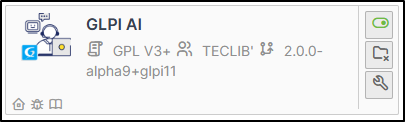
* Download and install the **GLPI AI** plugin from the marketplace.
***
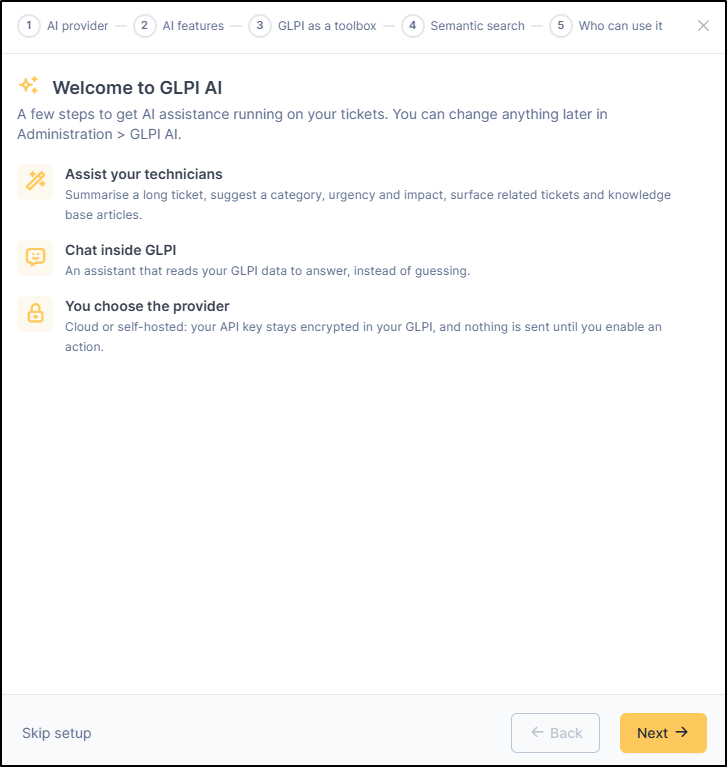
## Configure the plugin
This step can be replay anytime. A button to trigger it is available on the `Provider Settings` tabs top left
### Choose your provider
{% hint style="success" icon="lightbulb-on" %}
**GLPI AI** allows you to opt for a **self-hosted infrastructure**. During configuration, several connection parameters will need to be filled in.
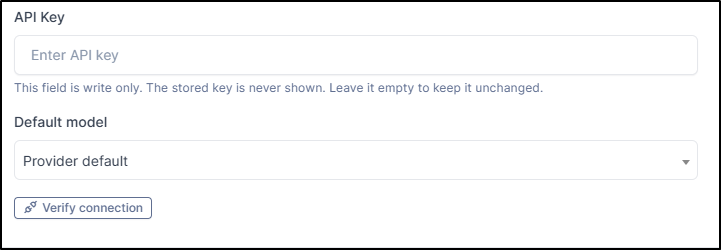
* API Key
* Host URL
* Default Model
* Custom Model ID
The **endpoint** must comply with the **OpenAI API specifications**. Depending on the software infrastructure and libraries hosted on your instance, malfunctions or partial incompatibilities may occur.

{% endhint %}
### Enter the API key and model
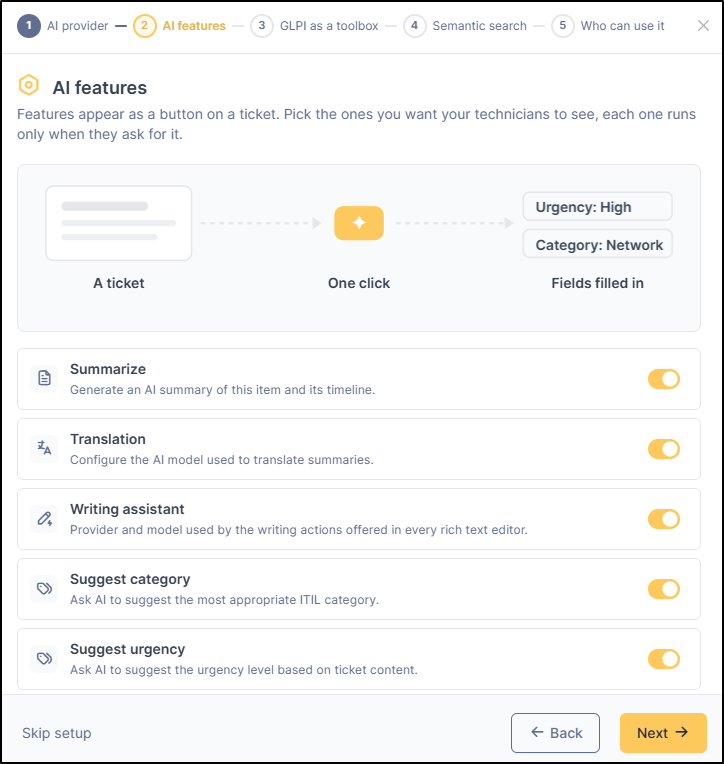
### Select AI features
Select the desired features for your instance.
* Summarize
* Translation
* Writing assistant
* Suggest category
* Suggest urgency
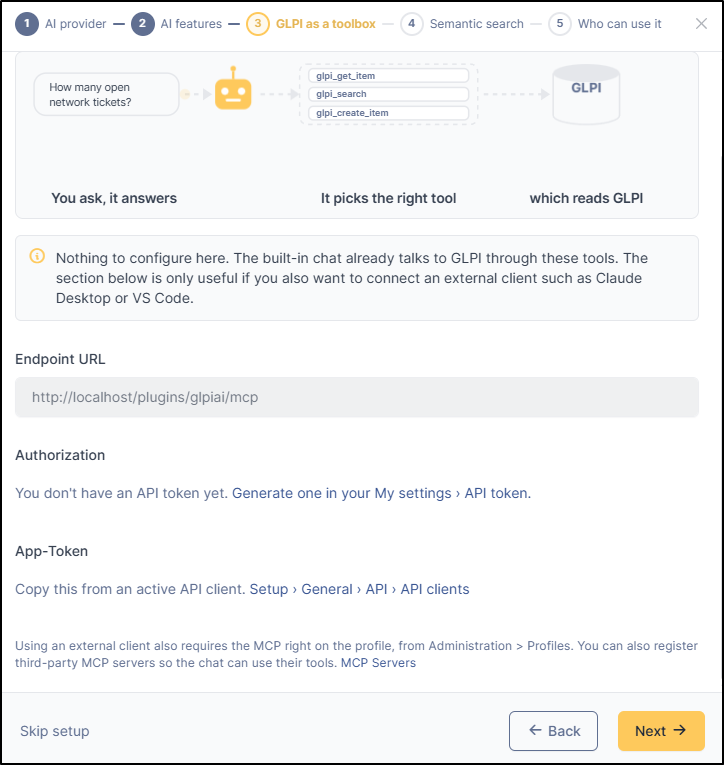
Optional step: If an API token has already been generated from the user profile (**`Administration`** > **`Users`** > *User* > **`API token`**) or via user preferences (**`My settings`** > **`API token`**), it will be pre-filled; otherwise, you can generate a new one.
### Semantic search and vectorization
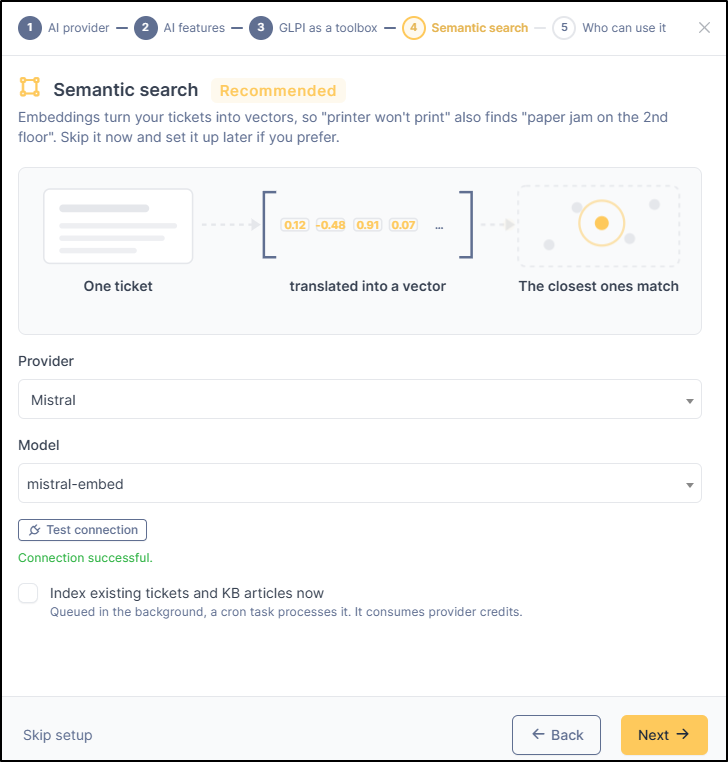
To expand search capabilities across tickets and the knowledge base and ensure more relevant results, you can index your ticket and knowledge base article databases (converting them into vectors). For example, when querying for tickets related to connection issues, GLPI will be able to display a broader list of results—including SSO problems, forgotten user passwords, or internet outages causing SSO failure, among others.
You can skip this step and configure it later. Otherwise, you will be asked to enter the desired provider and the model.
You can test the connection to ensure that communication between GLPI and your provider is operational.
{% hint style="warning" icon="sack-dollar" %}
**Please note: this step consumes credits.**
{% endhint %}
### Authorizations
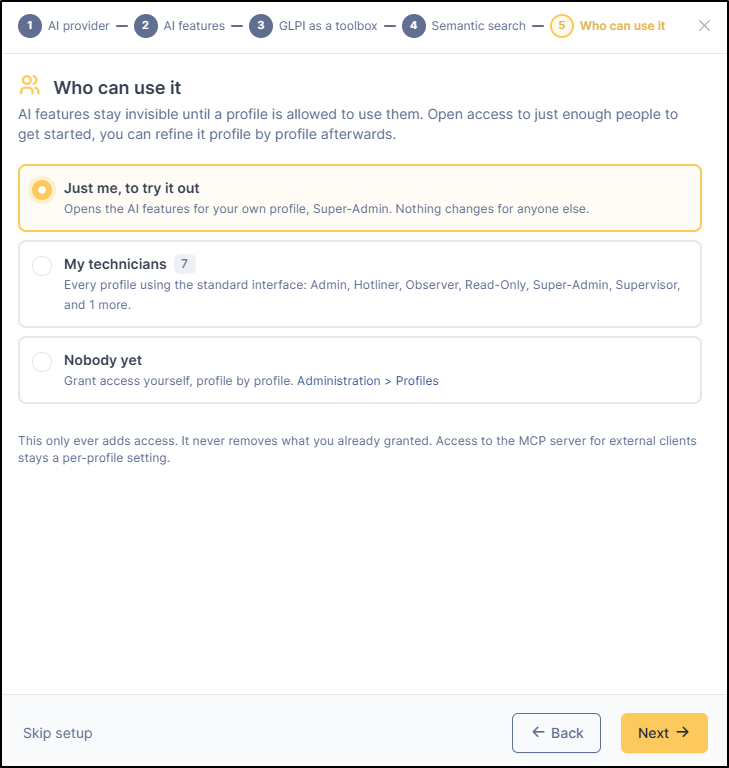
Select the profiles that have the ability to use GLPI AI.
* Just me
* All technicians
* Nobody
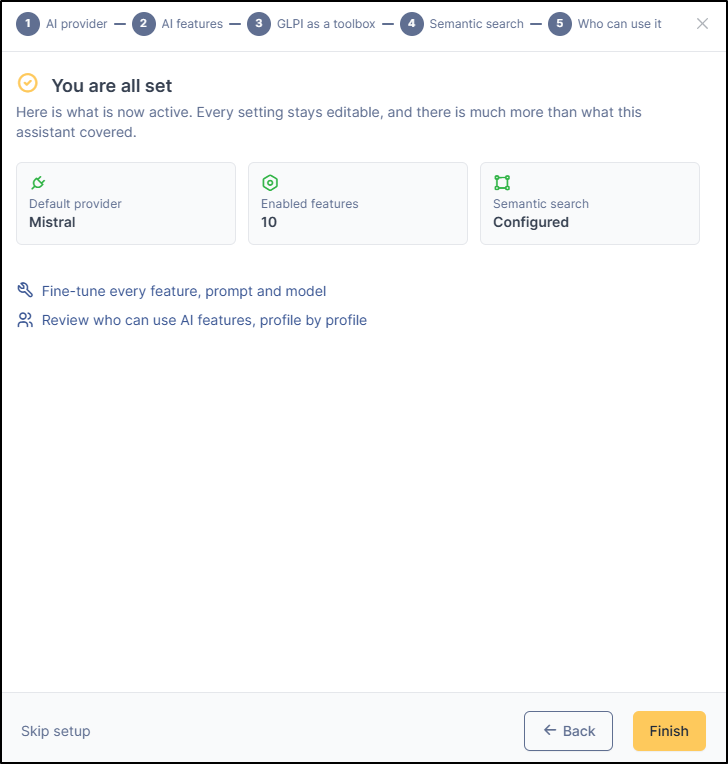
### Summary before validation
Ensure that everything is correctly configured before confirming your settings.
***
## Providers
You can configure multiple providers. You will be asked for API keys, as well as URLs for certain providers.
You can select your default provider using the star icon

***
## Features
You can choose which features will be enabled, as well as the associated provider.
### Chat
| Features | Available options | Description |
| ----------------------------- | -------------------------------------------------------------------------------------------------------------- | ------------------------------------------------------------------------------------------------------------------------------------------------------------------------------------------------------------------- |
| **Chat** | Expose MCP tools to chat | When enabled, the assistant can read, search, and update GLPI data through MCP tools.
User approval will be asked for data altering actions (everything that is not READ) and any external MCP calls.
|
| Stream chat responses | Show the answer as it is generated instead of waiting for the full reply. | |
| **Speech to text** | Auto-stop on silence | When enabled, recording stops automatically after \~1.5 seconds of silence. |
| Auto-send after transcription | When enabled, the transcribed text is sent to the chat automatically without requiring the user to press Send. | |
### Content
| Features | Available options | Description |
| -------------------------- | ------------------------------------------------------------------------------------------------------------------------------------------------------------------------------------------------------------------------------------------------------------------------------------------------ | ------------------------------------------------------------------------- |
| **Summarize** | Summary mode | Automatic mode will refresh the summary at every item update or followup. |
| Generate missing summaries | List the tickets that do not have a summary, so they can be processed later via a batch job (a less costly process). `**Glpiai - processSummaryQueue **`must be configured | |
| Automatic batch submission | When the queue holds at least 200 pending items, a discounted batch job is submitted to the provider instead of processing items one by one. Expect results within 24 hours. automatic actions`**Glpiai - pollBatchJob **`must be configured **(**`**Setup**` **>** `**automatic actions**`**)** | |
| **Translation** | No more option | |
| **Writing assistant** | Manager writing actions | Go to writing actions chapter to see more options |
### Classify
| Features | Available options | Description |
| ---------------------- | ----------------- | --------------------------------------------------------------------------------------------------------------------------------------------------------------------- |
| **Suggest category** | Automatically run | This feature will be run on every ITIL creation. Will erase any predefined filled value.
Item creation could be slow-down if you are using a slow AI modal.
|
| **Suggest impact** | Automatically run | This feature will be run on every ITIL creation. Will erase any predefined filled value.
Item creation could be slow-down if you are using a slow AI modal.
|
| \* **Suggest urgency** | Automatically run | This feature will be run on every ITIL creation. Will erase any predefined filled value.
Item creation could be slow-down if you are using a slow AI modal.
|
### Related content
| Features | Available options | Description |
| ------------------------------------- | ----------------- | ----------- |
| **Find related knowledge base items** | No more option | |
| **Find related tickets** | No more option | |
To switch providers, click on the current one, select "Edit," and choose the desired provider.

***
## Quick actions
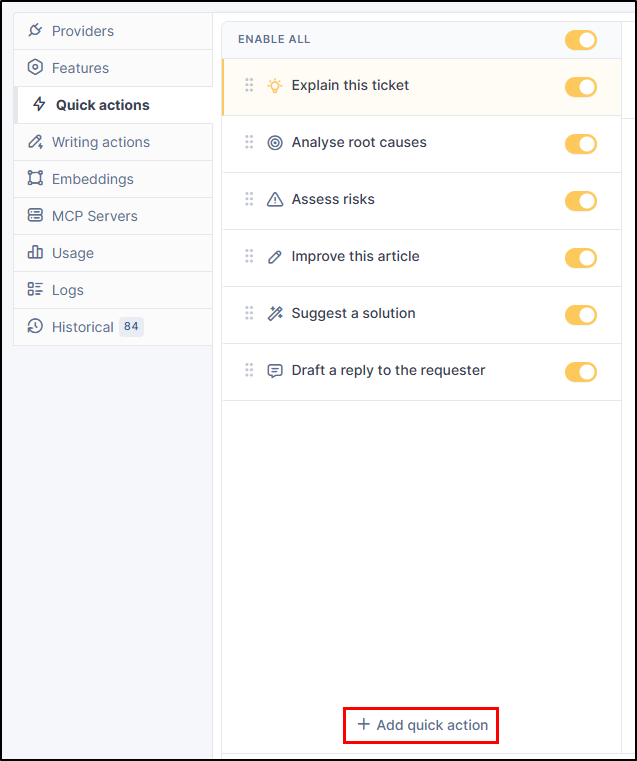
Quick actions are the actions offered to you when opening a new chat.

* Explain this ticket
* Analyse root causes
* Assess risks
* Improve this article
* Suggest a solution
* Draft a reply to the requester
Each quick action contains its own prompt and a few options, such as the icon to display and the context (ticket, problem, knowledge base, etc.).

You can add your own quick action by clicking on **`+ add quick option`**.
***
## Writing actions
You can configure options to assist with writing (e.g., a more professional tone, rephrasing, simplifying). Default options are available, but they can be modified or deleted.

* You can add a new category by clicking on **`+ Add category`**

**Options by default**
* Writing
* Proofread
* Rephrase
* Simplify
* Tone
* Make friendly
* Make professional
* Length
* Expand
* Shorten
* Key points
* Generate
* Propose a reply
Each action has its own prompt and configurable options (icon, title, etc.). 3 options are available for each option :
* **Requires text** : When off, the action can run on an empty editor.
* **Record context** : Lets the AI read the current record and its follow-ups through MCP tools.
* **Object types** : select an object type (change, ticklet, computer, etc.) or leave empty to offer the action everywhere
You can add an action by clicking on **`+ Add writing action`**
***
## Embeddings
This section allows you to choose the provider that will handle vectorizing your instance's data.

1. **Engine**: allows you to select the provider responsible for vectorization. You can setup a custom model ID
2. **Indexing**: number of chunks indexed. you can reindex, go to automatic actions or clear index from the menu
3. **How far back a search looks**: Determines the volume of closed tickets and knowledge base articles analyzed. The higher the value, the more comprehensive the search, but the slower it will be.
4. **Noise filter**: repeated phrases on the tickets (signatures, warnings) are removed prior to insertion so that the fingerprints stay distinctive. You can setup the automatic action **`Glpiai - recalibrateBoilerplate`**.This automated task serves to retrain the GLPI AI so that it learns the vocabulary actually used by users in recent tickets.
***
## MCP Servers
MCP servers allow GLPI to retrieve information from external sites (when an MCP server is available), such as a knowledge base or internal company documentation.

* By default, the internal GLPI server and GLPI documentation are already configured. You can disable or delete them as needed.
* To add a new MCP Server, click on **`+ Add Server`**
* You will be asked for certain information such as
* Name
* URL
* Description
* Authentication
* Custom hearders
***
## Usage
You can view usage (tokens, calls, errors, etc.) by provider, by feature, etc. You can also filter usage by time period.

### Available usage
* Breakdown by provider and model
* Provider totals
* Models
* Features & Trends
* Features
* Daily trend
* Detailed View
* Provider, model and feature
* Users
* Feature, calls, tokens, errors by user
***
## Logs
You can view the GLPI AI logs. A search area is available, and you can use tags to filter entries and make them easier to read.
* Debug
* Info
* Warning
* Error
* Exception

#### Deep debug logging
Enabling this option writes the details of all AI interactions (requests, responses, and MCP calls) to glpiai-debug.log in JSON format and displays them in real time below.
#### Clear logs
Truncate both glpiai.log and glpiai-debug.log files.
***
## Automatic actions
| **Name** | **Item type** | **Description** |
| -------------------------- | ------------- | -------------------------------------------------------------------------------------------------------------------------------------------------------------------------------------------------------------------------------------------------------------------------------------- |
| **pollBatchJobs** | AI batch job | Poll provider AI batch jobs and ingest their results. |
| **processSummaryQueue** | General | Process pending AI summary generation queue. |
| **processVectorQueue** | General | Process pending vector embedding indexing queue. |
| **recalibrateBoilerplate** | General | Recalibrate boilerplate detection phrase lists from the current ticket corpus. |
| **updateModelsDevCatalog** | General | Download the latest models.dev model catalog (context windows, capabilities, pricing) so recently released models are sized correctly instead of falling back to a conservative context budget. Requires outbound HTTPS to models.dev; can be disabled from the GLPI AI configuration. |
***
## On-premise specification
### Server configuration for GLPI AI
GLPI AI calls LLM providers that can take several seconds, sometimes a minute, to answer.\
During that time the PHP process handling the request stays busy.\
On a default PHP-FPM setup, a handful of concurrent AI requests is enough to make the whole GLPI instance unresponsive (pages hang, then 502/504 errors).
This page lists the settings to check when installing the plugin.
#### Size the PHP-FPM pool
PHP-FPM serves one request per worker.
Every chat turn, summary, classification or MCP tool call holds a worker until the provider answers — streamed or not.
The stock pool (`www.conf`) ships with `pm.max_children = 5`. Raise it:
```
; /etc/php/8.x/fpm/pool.d/www.conf
pm = dynamic
pm.max_children = 40
pm.start_servers = 8
pm.min_spare_servers = 4
pm.max_spare_servers = 12
```
How to choose `pm.max_children`:
* **Memory bound:** RAM available for PHP ÷ average memory per worker. Measure the latter on the server (`ps -o rss -C php-fpm8.x`); GLPI workers typically use 40–100 MB.
* **Load bound:** users expected to use AI at the same time + normal GLPI traffic.
Check the FPM log for `server reached pm.max_children setting`.It means the pool is too small.
#### Optional: Dedicated pool for AI traffic
On larger instances, route the plugin to its own pool so a burst of AI requests cannot starve the rest of GLPI.
```
location ~ ^/plugins/glpiai/ {
fastcgi_pass unix:/run/php/php8.x-fpm-glpiai.sock;
# ... same fastcgi parameters as the main GLPI location
}
```
#### Proxy timeouts and buffering
Streamed answers use Server-Sent Events. The web server must not buffer them and must wait long enough for long turns.
**nginx**
```
fastcgi_read_timeout 300s;
fastcgi_buffering off; # the plugin also sends X-Accel-Buffering: no
gzip off; # for the plugin location, if gzip buffers the stream
```
**Apache (PHP-FPM through mod\_proxy\_fcgi)**
```
ProxyTimeout 300
```
Also make sure `zlib.output_compression` is `Off` in `php.ini`, and that no reverse proxy or WAF in front of GLPI buffers `text/event-stream` responses.
#### Enable HTTP/2
Over HTTP/1.1, browsers open at most 6 connections per site, shared by all tabs.\
An open stream occupies one of them, so several GLPI tabs streaming at once can block page loads in the browser.\
HTTP/2 carries all requests over a single connection and removes this limit.
HTTP/2 requires HTTPS.
```
server {
listen 443 ssl;
http2 on; # nginx >= 1.25.1; older versions: "listen 443 ssl http2;"
}
```
```
# mod_http2 enabled; requires PHP-FPM (not mod_php with the prefork MPM)
Protocols h2 http/1.1
```
HTTP/2 does not add PHP workers: section 1 still applies.
#### MCP clients: prefer Streamable HTTP
External MCP clients (Claude Desktop, VS Code, …) can connect in two ways:
| Transport | Configuration | Server cost |
| --------------- | ---------------- | --------------------------------------------------------- |
| Streamable HTTP | `"type": "http"` | One worker per request, only during the call |
| Legacy SSE | `"type": "sse"` | One worker held for as long as the client stays connected |
Configure clients with Streamable HTTP whenever they support it.
The legacy SSE stream is closed by the server every 5 minutes and the client reconnects, but each connected legacy client still permanently occupies one worker in practice.
### GLPI MCP Plugin
MCP (Model Context Protocol) server plugin for GLPI 11.\
This plugin allows AI clients like Claude Desktop, IDE assistants, or a future built-in GLPI AI assistant to interact with GLPI through a standardized protocol.
#### Features
* **MCP Server**: Exposes GLPI functionality via the MCP protocol
* **API Token Authentication**: Uses GLPI's existing API token system for secure access
* **Session Authentication**: Supports internal session-based auth for future GLPI AI assistant
#### Configuration
#### Claude Desktop
Add to your `claude_desktop_config.json`:
```
{
"mcpServers": {
"glpi": {
"url": "https://your-glpi.example.com/plugins/glpiai/mcp",
"headers": {
"App-Token": "YOUR_GLPI_APP_TOKEN",
"Authorization": "user_token YOUR_GLPI_USER_TOKEN"
}
}
}
}
```
#### VS Code (GitHub Copilot)
Add to your VS Code `settings.json`:
```
{
"glpi-sse": {
"url": "https://your-glpi.example.com/plugins/glpiai/mcp",
"type": "sse",
"headers": {
"App-Token": "YOUR_GLPI_APP_TOKEN",
"Authorization": "user_token YOUR_GLPI_USER_TOKEN"
}
}
}
```
or
```
{
"mcp": {
"servers": {
"glpi": {
"url": "https://your-glpi.example.com/plugins/glpiai/mcp",
"type": "http",
"headers": {
"App-Token": "YOUR_GLPI_APP_TOKEN",
"Authorization": "user_token YOUR_GLPI_USER_TOKEN"
}
}
}
}
}
```
#### Getting API Tokens
1. **App Token**: Setup > General > API
* Create a new API client
* Copy the generated App Token
2. **User Token**: Administration > Users > \[Your User] > Remote access keys
* Regenerate API token if needed
* Copy the user token
#### Endpoints
| Endpoint | Method | Description |
| ----------------------------- | ------ | ----------------------------------------------------------------------------------------- |
| `/plugins/glpiai/mcp` | GET | Legacy SSE stream (sends message endpoint URL, closed after 5 min, the client reconnects) |
| `/plugins/glpiai/mcp` | POST | Streamable HTTP transport (JSON-RPC) |
| `/plugins/glpiai/mcp/message` | POST | JSON-RPC message endpoint (legacy SSE transport) |
| `/plugins/glpiai/mcp/health` | GET | Health check |
Prefer the Streamable HTTP transport (`"type": "http"`): each legacy SSE client keeps one PHP worker busy for as long as it is connected.
---
# Agent Instructions
This documentation is published with GitBook. GitBook is the documentation platform designed so that both humans and AI agents can read, navigate, and reason over technical content effectively. Learn more at gitbook.com.
## Querying This Documentation
If you need additional information that is not directly available in this page, you can query the documentation by asking a question.
Perform an HTTP GET request on the following URL with the `ask` and `goal` query parameters:
```
GET https://help.glpi-project.org/doc-plugins/plugin-glpi-network/glpi-ai.md?ask=&goal=
```
`ask` is the immediate question: it should be specific, self-contained, and written in natural language.
`goal` is what the user is ultimately trying to achieve, the reason they need the answer. Sharing it helps GitBook give you a better, more relevant answer. A goal is most helpful when it describes the outcome the user wants rather than restating the question. For example, with `ask=how do I create an API token`, a goal like `automate deployments from our CI pipeline` lets GitBook tailor the answer to that use case.
The response will contain a direct answer to the question and relevant excerpts and sources from the documentation.
Use this mechanism when the answer is not explicitly present in the current page, you need clarification or additional context, or you want to retrieve related documentation sections.