> For the complete documentation index, see [llms.txt](https://help.glpi-project.org/llms.txt). Markdown versions of documentation pages are available by appending `.md` to page URLs; this page is available as [Markdown](https://help.glpi-project.org/documentation/fr/readme-1-1/general.md).
# Général
## Choisir un navigateur web
GLPI nécessite l'utilisation d'un navigateur web.
Le fonctionnement optimal de l'application est obtenu en utilisant un navigateur moderne et conforme aux standards du web.
Les navigateurs web suivants sont supportés :
* Edge
* Firefox (y compris les 2 dernières versions ESR)
* Chrome
GLPI fonctionne également sur mobile ; il est généralement compatible avec les versions mobiles des navigateurs supportés.
## Comment se connecter
Ouvrez votre navigateur et accédez à la page d'accueil de GLPI ([https://{glpi\_address}/](https://{glpi_address})).
L'accès à la pleine fonctionnalité de l'application nécessite une authentification. Un utilisateur non authentifié peut éventuellement accéder à certaines fonctions si GLPI a été configuré pour le permettre :
* Ouvrir un ticket,
* Consulter les actifs,
* Voir la `FAQ (Foire Aux Questions)`,
* etc.
Selon le profil de l'utilisateur authentifié, il pourra se voir présenter l'[interface standard](#standard_interface) ou une [interface simplifiée](#simplified_interface).
## Terminer sa session
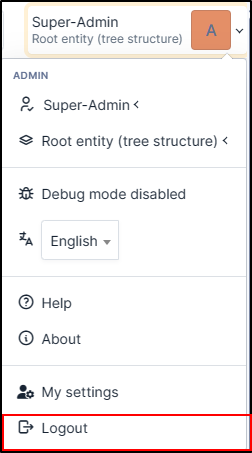
Pour vous déconnecter, cliquez sur le bouton de déconnexion situé en haut à droite de l'écran. Une fois déconnecté, vous serez redirigé vers la page de connexion.
---
# Agent Instructions
This documentation is published with GitBook. GitBook is the documentation platform designed so that both humans and AI agents can read, navigate, and reason over technical content effectively. Learn more at gitbook.com.
## Querying This Documentation
If you need additional information that is not directly available in this page, you can query the documentation dynamically by asking a question.
Perform an HTTP GET request on the current page URL with the `ask` query parameter, and the optional `goal` query parameter:
```
GET https://help.glpi-project.org/documentation/fr/readme-1-1/general.md?ask=&goal=
```
`ask` is the immediate question: it should be specific, self-contained, and written in natural language.
`goal` is optional and describes the broader end goal you are ultimately trying to accomplish on behalf of the user. GitBook uses it to tailor the answer towards what is most useful for that goal.
The response will contain a direct answer to the question and relevant excerpts and sources from the documentation.
Use this mechanism when the answer is not explicitly present in the current page, you need clarification or additional context, or you want to retrieve related documentation sections.