> For the complete documentation index, see [llms.txt](https://help.glpi-project.org/llms.txt). Markdown versions of documentation pages are available by appending `.md` to page URLs; this page is available as [Markdown](https://help.glpi-project.org/faq/glpi/preinstallation.md).
# Pre-installation - Recommendations
***
### Before installing a GLPI server, what should you consider?
It's important to determine several criteria before installing a GLPI server. Some of these may have an impact on the load on the server(s), others on the network load. The right questions to ask yourself before setting up your server are :
:arrow\_forward: How many users will be able to connect at the same time?
:arrow\_forward: Will there be automatic inventories?
* If so, estimate the number of assets (computers, monitors, applications, etc.) that will be brought up.
:arrow\_forward: Will a backup system be set up?
* If so, estimate the resources required to launch backups.
:arrow\_forward: Do potential IS security layers consume resources, or can they create latencies?
:arrow\_forward: What system resources are available to you?
* if hosting on-premise :
* Rack availability
* Which hardware to order
* Budget constraints
* Hosting with a provider ([Cloud Offer](https://glpi-network.cloud/) available)
:arrow\_forward: Are there any recovery constraints (implementation of clusters, load balancing, HA, etc.)?
:arrow\_forward: Are there any short/medium/long-term business growth forecasts?
Depending on the answers, a simple or improved architecture could be considered.
***
### What should you think about for a GLPI with heavy traffic?
The more traffic there is to/from your GLPI, the more resources you'll need.
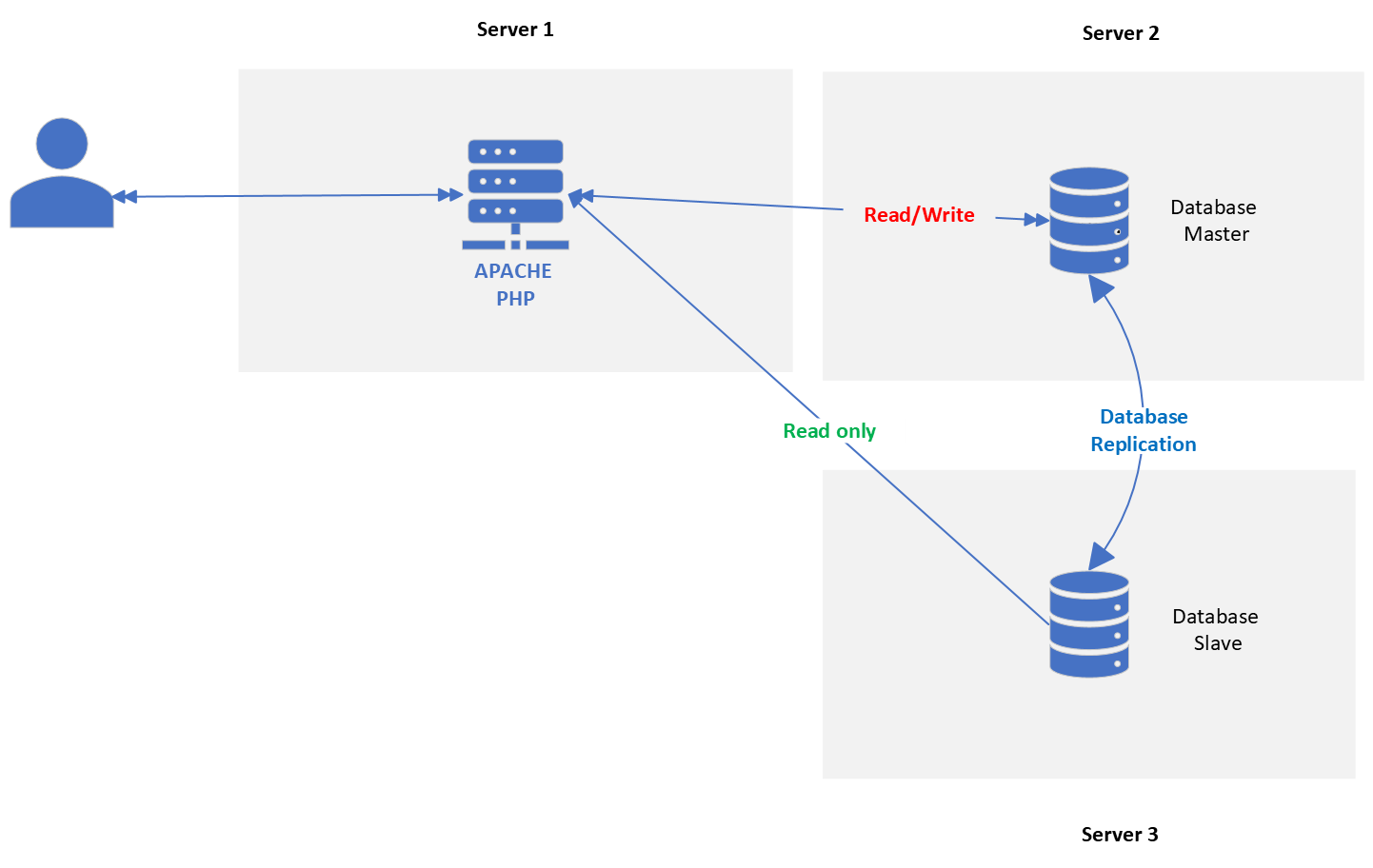
If you assume a large number of users and/or assets to be inventoried, you should consider at least an enhanced archtecture :
{% hint style="success" %}
**Type of enhanced architecture**
 {% endhint %}
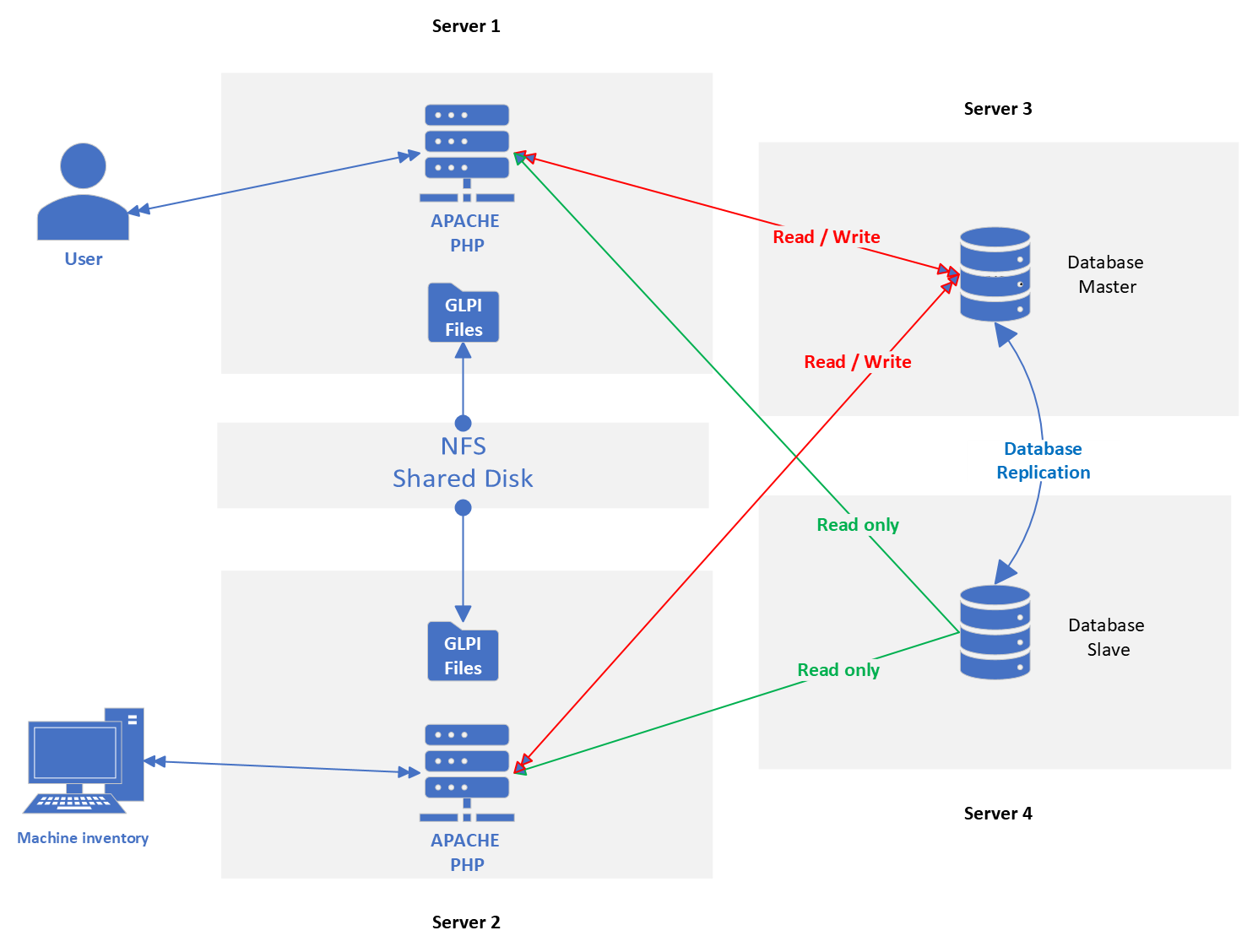
For high-traffic architecture, we strongly suggest :
:arrow\_forward: Separate web front-ends :
* one for users
* one for inventory
:arrow\_forward: Evaluate APACHE resources correctly
* 8-core CPU minimum per machine
* Calibrate configuration for simultaneous task management (connections, worker, etc.)
:arrow\_forward: Ensure sufficient bandwidth
:arrow\_forward: Deport SQL layer to a dedicated server
:arrow\_forward: Associate a second server for SQL replication (necessary for disaster recovery)
:arrow\_forward: Associated resources for the SQL layer :
* RAM: 16 or 32 GB
* Coniguring 2 GB RAM to the InnoDB buffer pool
* Remember to increase values for temporary table management
* Disk: Nvme -> indispensable for fast database writes
:arrow\_forward: WEB connection <-> SQL :
* Sufficient bandwidth
* Minimize latency between machines
* If you're using a provider, we strongly encourage you to ensure that the machines are on the same physical site
:arrow\_forward: Add an NFS share to share **`files`** between upstream WEB servers (sessions, attachments, XML inventories, etc...).
{% hint style="success" %}
**Type of enhanced architecture**
{% endhint %}
For high-traffic architecture, we strongly suggest :
:arrow\_forward: Separate web front-ends :
* one for users
* one for inventory
:arrow\_forward: Evaluate APACHE resources correctly
* 8-core CPU minimum per machine
* Calibrate configuration for simultaneous task management (connections, worker, etc.)
:arrow\_forward: Ensure sufficient bandwidth
:arrow\_forward: Deport SQL layer to a dedicated server
:arrow\_forward: Associate a second server for SQL replication (necessary for disaster recovery)
:arrow\_forward: Associated resources for the SQL layer :
* RAM: 16 or 32 GB
* Coniguring 2 GB RAM to the InnoDB buffer pool
* Remember to increase values for temporary table management
* Disk: Nvme -> indispensable for fast database writes
:arrow\_forward: WEB connection <-> SQL :
* Sufficient bandwidth
* Minimize latency between machines
* If you're using a provider, we strongly encourage you to ensure that the machines are on the same physical site
:arrow\_forward: Add an NFS share to share **`files`** between upstream WEB servers (sessions, attachments, XML inventories, etc...).
{% hint style="success" %}
**Type of enhanced architecture**
 {% endhint %}
***
### Cluster, Load-Balancing, High-Availability: can GLPI be integrated into this type of architecture?
Yes, this type of architecture is perfectly feasible with GLP. It's part of a high-availability, disaster recovery mode, in the event of the failure of one of the servers.
For example, you can :
* add a reverse-proxy server upstream of the 2 WEB servers
* add a 3rd WEB server and better distribute the load (manage fault tolerance)
* replace simple `MASTER / SLAVE` replication with a database cluster, requiring at least 3 DB nodes
***
### What flows does GLPI use?
**Mandatory flows**
| From | To | Prot./Appli. | Port | Comment |
| ---- | --------- | ------------ | -------- | ------------------------------ |
| User | GLPI | HTTP(S) | 80 (443) | http(s) : //glpi/ |
| GLPI | Databases | MySQL | 3306 | Another port can be configured |
**Optional Flows - LDAP/CAS connection**
| From | To | Prot./Appli. | Port | Comment |
| ---- | -------------- | ------------ | --------- | --------------------------------------- |
| GLPI | LDAP directory | LDAP(S) | 389 (636) | Synchronization and user authentication |
**Optional flows - MAIL connection**
| From | To | Prot./Appli. | Port | Comment |
| ---- | ----------- | ------------ | ------------- | ------------------------------------------- |
| GLPI | Mail server | SMTP(S) | 25 (465), 587 | Send email notifications |
| GLPI | Mail server | IMAP(S) | 143 (993) | Mail retrieval (receiver) > ticket creation |
**Optional flows - GLPI Inventory Basic module (inventory)**
| From | To | Prot./Appli. | Port | Comment |
| ------ | ------ | ------------ | -------- | ----------------------------------------- |
| Agents | Server | HTTP(S) | 80 (443) | http(s) : //glpi/plugins/fusioninventory/ |
| GLPI | Agents | HTTP | 62354 | Remote agent wake-up (from GLPI) |
**Optional flows - GLPI Inventory Advanced modules**
| From | To | Prot./Appli. | Port | Comment |
| ------ | ------ | ------------ | -------- | ------------------- |
| Agents | Equip. | SNMP | 161,162 | Network inventories |
| Agents | Equip. | NMAP | ICMP,DNS | Network discovery |
| Agents | VMWARE | HTTPS | 443 | VMWare inventory |
***
### Where can I find the GLPI database schema?
\
You can find the database schemas for GLPI 10 and GLPI 11 at the URL below.
{% embed url="" %}
***
### More Ressources :
* [Apache](https://httpd.apache.org/)
* [Nginx](https://docs.nginx.com/nginx/admin-guide/installing-nginx/installing-nginx-open-source/)
* [PHP](https://www.php.net/docs.php)
* [MariaDB](https://mariadb.com/kb/en/)
* [MySQL](https://dev.mysql.com/doc/)
---
# Agent Instructions
This documentation is published with GitBook. GitBook is the documentation platform designed so that both humans and AI agents can read, navigate, and reason over technical content effectively. Learn more at gitbook.com.
## Querying This Documentation
If you need additional information that is not directly available in this page, you can query the documentation dynamically by asking a question.
Perform an HTTP GET request on the current page URL with the `ask` query parameter, and the optional `goal` query parameter:
```
GET https://help.glpi-project.org/faq/glpi/preinstallation.md?ask=&goal=
```
`ask` is the immediate question: it should be specific, self-contained, and written in natural language.
`goal` is optional and describes the broader end goal you are ultimately trying to accomplish on behalf of the user. GitBook uses it to tailor the answer towards what is most useful for that goal.
The response will contain a direct answer to the question and relevant excerpts and sources from the documentation.
Use this mechanism when the answer is not explicitly present in the current page, you need clarification or additional context, or you want to retrieve related documentation sections.
{% endhint %}
***
### Cluster, Load-Balancing, High-Availability: can GLPI be integrated into this type of architecture?
Yes, this type of architecture is perfectly feasible with GLP. It's part of a high-availability, disaster recovery mode, in the event of the failure of one of the servers.
For example, you can :
* add a reverse-proxy server upstream of the 2 WEB servers
* add a 3rd WEB server and better distribute the load (manage fault tolerance)
* replace simple `MASTER / SLAVE` replication with a database cluster, requiring at least 3 DB nodes
***
### What flows does GLPI use?
**Mandatory flows**
| From | To | Prot./Appli. | Port | Comment |
| ---- | --------- | ------------ | -------- | ------------------------------ |
| User | GLPI | HTTP(S) | 80 (443) | http(s) : //glpi/ |
| GLPI | Databases | MySQL | 3306 | Another port can be configured |
**Optional Flows - LDAP/CAS connection**
| From | To | Prot./Appli. | Port | Comment |
| ---- | -------------- | ------------ | --------- | --------------------------------------- |
| GLPI | LDAP directory | LDAP(S) | 389 (636) | Synchronization and user authentication |
**Optional flows - MAIL connection**
| From | To | Prot./Appli. | Port | Comment |
| ---- | ----------- | ------------ | ------------- | ------------------------------------------- |
| GLPI | Mail server | SMTP(S) | 25 (465), 587 | Send email notifications |
| GLPI | Mail server | IMAP(S) | 143 (993) | Mail retrieval (receiver) > ticket creation |
**Optional flows - GLPI Inventory Basic module (inventory)**
| From | To | Prot./Appli. | Port | Comment |
| ------ | ------ | ------------ | -------- | ----------------------------------------- |
| Agents | Server | HTTP(S) | 80 (443) | http(s) : //glpi/plugins/fusioninventory/ |
| GLPI | Agents | HTTP | 62354 | Remote agent wake-up (from GLPI) |
**Optional flows - GLPI Inventory Advanced modules**
| From | To | Prot./Appli. | Port | Comment |
| ------ | ------ | ------------ | -------- | ------------------- |
| Agents | Equip. | SNMP | 161,162 | Network inventories |
| Agents | Equip. | NMAP | ICMP,DNS | Network discovery |
| Agents | VMWARE | HTTPS | 443 | VMWare inventory |
***
### Where can I find the GLPI database schema?
\
You can find the database schemas for GLPI 10 and GLPI 11 at the URL below.
{% embed url="" %}
***
### More Ressources :
* [Apache](https://httpd.apache.org/)
* [Nginx](https://docs.nginx.com/nginx/admin-guide/installing-nginx/installing-nginx-open-source/)
* [PHP](https://www.php.net/docs.php)
* [MariaDB](https://mariadb.com/kb/en/)
* [MySQL](https://dev.mysql.com/doc/)
---
# Agent Instructions
This documentation is published with GitBook. GitBook is the documentation platform designed so that both humans and AI agents can read, navigate, and reason over technical content effectively. Learn more at gitbook.com.
## Querying This Documentation
If you need additional information that is not directly available in this page, you can query the documentation dynamically by asking a question.
Perform an HTTP GET request on the current page URL with the `ask` query parameter, and the optional `goal` query parameter:
```
GET https://help.glpi-project.org/faq/glpi/preinstallation.md?ask=&goal=
```
`ask` is the immediate question: it should be specific, self-contained, and written in natural language.
`goal` is optional and describes the broader end goal you are ultimately trying to accomplish on behalf of the user. GitBook uses it to tailor the answer towards what is most useful for that goal.
The response will contain a direct answer to the question and relevant excerpts and sources from the documentation.
Use this mechanism when the answer is not explicitly present in the current page, you need clarification or additional context, or you want to retrieve related documentation sections.