> For the complete documentation index, see [llms.txt](https://help.glpi-project.org/llms.txt). Markdown versions of documentation pages are available by appending `.md` to page URLs; this page is available as [Markdown](https://help.glpi-project.org/faq/plugins/formcreator.md).
# Formcreator
***
### How do I set up a form?
A [procedure ](/doc-plugins/plugins-glpi/formcreator.md)is available to help you set up your forms.
***
### Can I create public forms?
Public access to forms is set from the **`access types`** tab on the form.
***
### Can I restrict access to forms (to an entity, a profile, etc.)?
Access restriction is set from the **`access types`** tab from the form. It is possible to restrict access to groups, individuals and profiles. And more simply, to users authenticated on GLPI.
{% hint style="success" %}
**Restriction by entity**
To restrict a form to an entity, you can either create the form in the corresponding entity, or create it in the root entity but specify a restriction with **`private access`** to the desired entity.
{% endhint %}
***
### Can I request validation of a form before sending it to support?
Forms have a **`validators`** tab. It is possible to request validation of the form from a group or a specific user.
***
### What types of questions are available in the forms?
There are many types of question. For example, you can use :
* Checkboxes,
* Radio buttons,
* Date fields
* Free fields,
* Value selection,
* GLPI objects.
This list is not exhaustive and many other options are possible. There are **25 possible types of questions** to ask your users.
***
### Can certain questions be hidden under certain conditions?
It is possible to hide or show questions according to certain criteria. This option is set in the **`questions`** tab of the form.
{% hint style="success" %}
**Example**
Is your version of GLPI up to date ? If yes, hide the question "what is your current version". 
{% endhint %}
***
### Can an SLA be applied from a form?
An SLA can be applied via a form. You can do this by going to the **`target`** tab. You will be able to set up an SLA and/or OLA either via a template, a specific SLA or equal to a question asked in the form.
***
### Can I attach a document to a form?
With the question types, it is possible to ask a user to select a document in the form. The question is of the "GLPI object" type. All you have to do is select the type of object. You must ensure that the documents can be read by the entities concerned in **`management`** > **`documents`**.
***
### Is it possible to import FormCreator forms from one instance to another?
The import/export action is made to migrate data from a pre-production instance to a production one (implied rigorously identical). Importing a form from another instance that is not identical will fail or will be imported only partially.
***
### Why are there special characters in all or some of my tickets?
This can happen after a migration or update of GLPI (and/or the plugin). There is a command in the GLPI CLI to correct this anomaly. This is provided by the FormCreator plugin.
{% hint style="warning" %}
**Know before entering the order**
As a precaution, we **strongly recommend** that you perform a **backup** of your instance and database.\
We also invite you to implement this [patch](https://github.com/pluginsGLPI/formcreator/commit/2681eca61797615f9e07d808a7eb545a255af59b.diff). Here is the procedure to [apply a patch](/tutorials/procedures/appliquer_un_patch.md)
{% endhint %}
Command to enter from your GLPI file:\
**`php -d memory_limit=-1 bin/console plugins:formcreator:clean_tickets`**
***
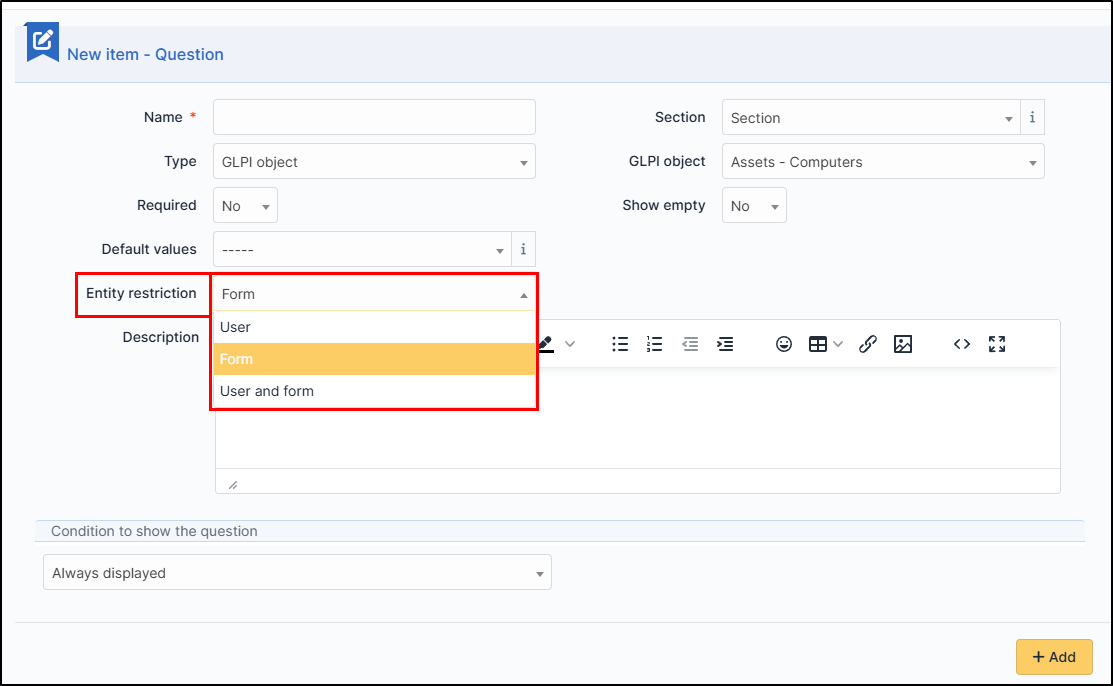
## How to restrict GLPI object selection from a form
When you create a form, the requester can select a GLPI object (user, computer, etc.). You can restrict this selection to the user entity, the form entity or both.
**Explanation**:
* **User**: What the user can see depending on where he is positioned.
* **Form**: What the form can see from where it is positioned.
* **User and form**: Both cumulated.
---
# Agent Instructions
This documentation is published with GitBook. GitBook is the documentation platform designed so that both humans and AI agents can read, navigate, and reason over technical content effectively. Learn more at gitbook.com.
## Querying This Documentation
If you need additional information that is not directly available in this page, you can query the documentation dynamically by asking a question.
Perform an HTTP GET request on the current page URL with the `ask` query parameter, and the optional `goal` query parameter:
```
GET https://help.glpi-project.org/faq/plugins/formcreator.md?ask=&goal=
```
`ask` is the immediate question: it should be specific, self-contained, and written in natural language.
`goal` is optional and describes the broader end goal you are ultimately trying to accomplish on behalf of the user. GitBook uses it to tailor the answer towards what is most useful for that goal.
The response will contain a direct answer to the question and relevant excerpts and sources from the documentation.
Use this mechanism when the answer is not explicitly present in the current page, you need clarification or additional context, or you want to retrieve related documentation sections.