> For the complete documentation index, see [llms.txt](https://help.glpi-project.org/llms.txt). Markdown versions of documentation pages are available by appending `.md` to page URLs; this page is available as [Markdown](https://help.glpi-project.org/glpi-12/administration/inventory.md).
# Inventory
## Enable Inventory
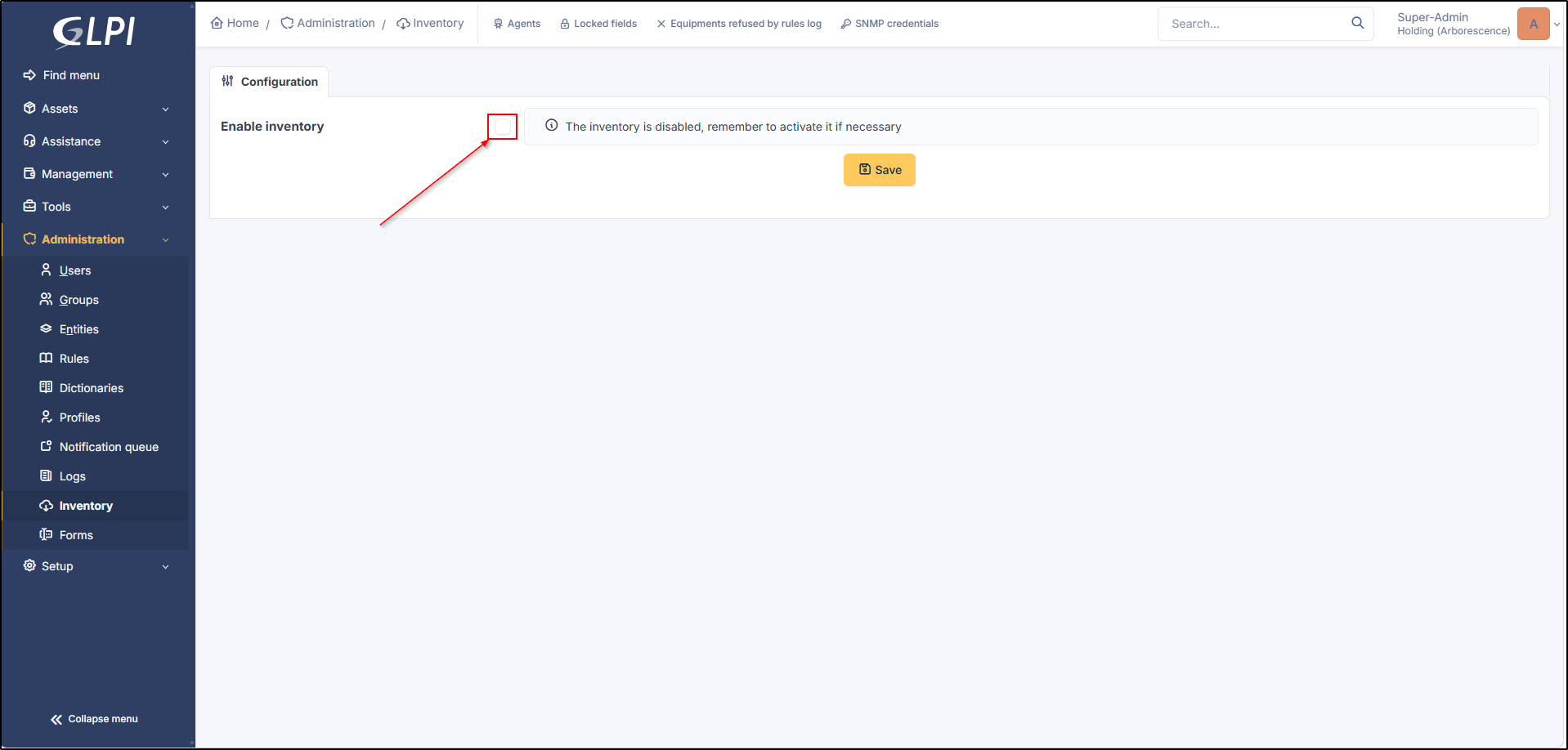
To access the inventory, it must be enabled from **`Administration`** > **`Inventory`**
Enable inventory
***
## Inventory Options
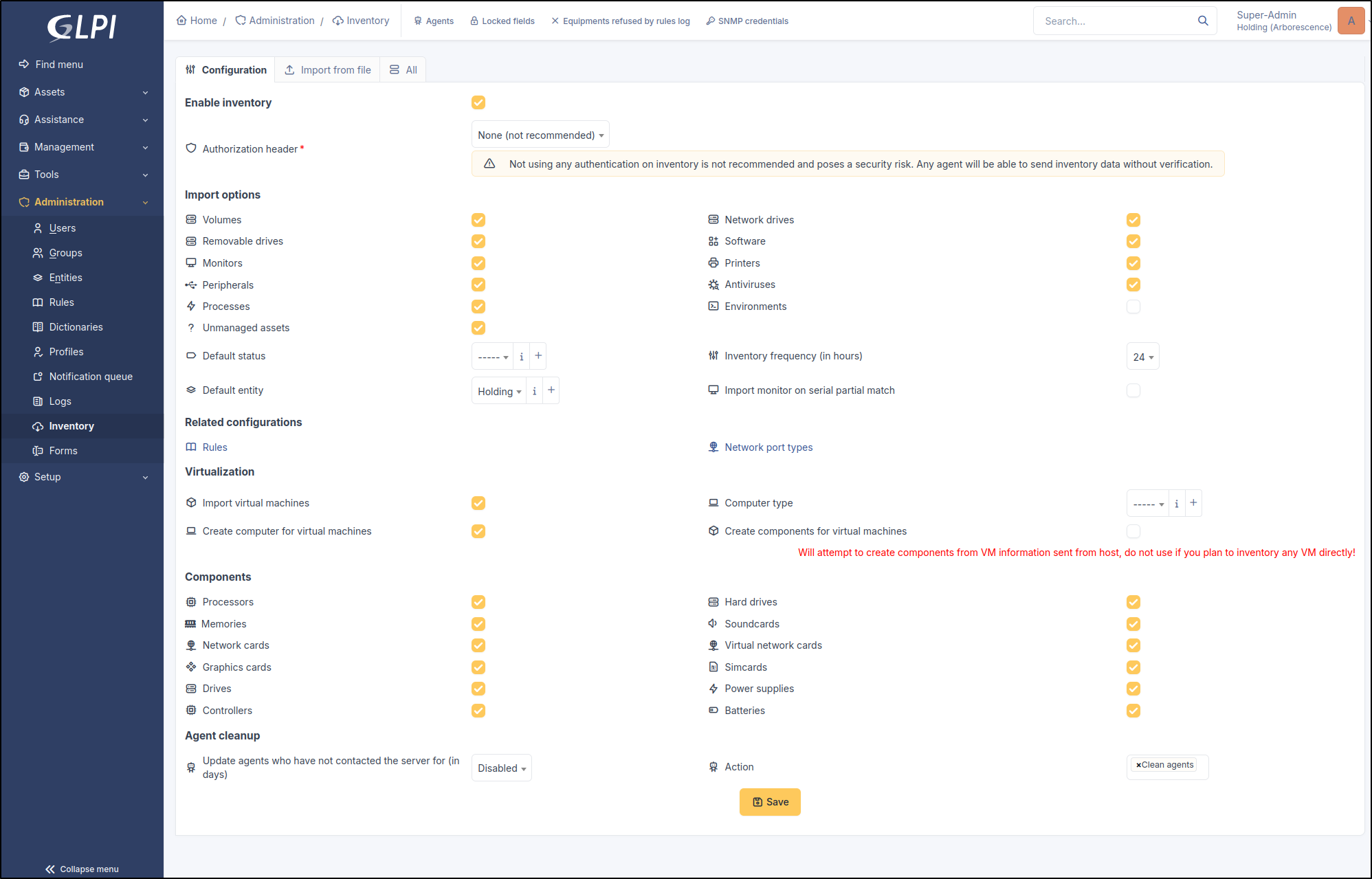
Several configuration options are possible once inventory is enabled, such as import, virtualization, etc.
Inventory options
### Agent Authentication
Agent authentication adds a layer of security to the inventory. If an agent attempts to register in the inventory without an authentication method, it will be rejected by GLPI.
2 methods can be configured:
* **OAuth - Client Credentials**: creation of an [OAuth client](/glpi-12/setup/oauth-clients.md) allowing asset authentication.
* **Basic Authentication**: authentication using an ID and password.
{% hint style="danger" %}
We strongly advise you to **use** one of the **authentication methods** to **secure** your **inventory** reports.
{% endhint %}
View agent documentation
### Import Options
You can configure the information that will be reported during an inventory:
* Volumes
* Network drives
* Removable drives
* Software
* Monitors
* Printers
* Peripherals
* Antivirus
* Processes
* Environments
* Unmanaged assets
**Default status**: defines a status when a new asset is reported in the inventory
**Inventory frequency (in hours):**
**Default entity**: defines the entity in which the hardware will be reported (root entity by default)
**Import a monitor with partial serial number matching:**
### Related Configurations
**Rules**: Allows adding inventory rules to assets
**Network port type**: adds and defines [network port types](/glpi-12/tabs/network_ports.md)
### Virtualization
* **Import virtual machines**: allows importing virtual machines present on a computer
* **Computer type**: defines the computer type for a virtual machine
* **Create a computer for virtual machines**: allows creating a computer when a virtual machine is detected on a computer (it will then be visible in the inventory as an asset)
* **Create components for virtual machines**: GLPI will attempt to create components from the VM information sent by the host. Do not use if you plan to inventory VMs directly.
### Components
Allows or disallows the reporting of asset components:
* Processors
* Hard drives
* Memories
* Soundcards
* Network cards
* Virtual network cards
* Graphics cards
* SIM cards
* Drives
* Power supplies
* Controllers
* Batteries
### Agent Cleanup
**Update agents that have not contacted the server for (in days)**: allows configuring an action (see below) after a defined time when an agent has not contacted the server for X days
**Action**: clean up agents, change the status, put asset in the trash
***
## Import Inventory Files
File import allows adding one or more computers from a `JSON`, `XML`, or `OCS` file. You can also import a compressed archive with multiple inventory files.
---
# Agent Instructions
This documentation is published with GitBook. GitBook is the documentation platform designed so that both humans and AI agents can read, navigate, and reason over technical content effectively. Learn more at gitbook.com.
## Querying This Documentation
If you need additional information that is not directly available in this page, you can query the documentation dynamically by asking a question.
Perform an HTTP GET request on the current page URL with the `ask` query parameter, and the optional `goal` query parameter:
```
GET https://help.glpi-project.org/glpi-12/administration/inventory.md?ask=&goal=
```
`ask` is the immediate question: it should be specific, self-contained, and written in natural language.
`goal` is optional and describes the broader end goal you are ultimately trying to accomplish on behalf of the user. GitBook uses it to tailor the answer towards what is most useful for that goal.
The response will contain a direct answer to the question and relevant excerpts and sources from the documentation.
Use this mechanism when the answer is not explicitly present in the current page, you need clarification or additional context, or you want to retrieve related documentation sections.