> For the complete documentation index, see [llms.txt](https://help.glpi-project.org/llms.txt). Markdown versions of documentation pages are available by appending `.md` to page URLs; this page is available as [Markdown](https://help.glpi-project.org/glpi-12/assistance/tabs/pending-reason.md).
# Pending reason
A reason to wait allows you to put a ticket on hold, send automatic reminders and resolve the ticket if it has not received a response. All these actions are subject to conditions:
* the interval between automatic follow-ups;
* the number of follow-ups before resolution;
* setting up a follow-up template;
* implementation of a solution template.
## Create a pending reason
* Go to **`setup`** > **`dropdowns`** and enter **`pending reasons`** in the search box
* Click on **`+ Add`**
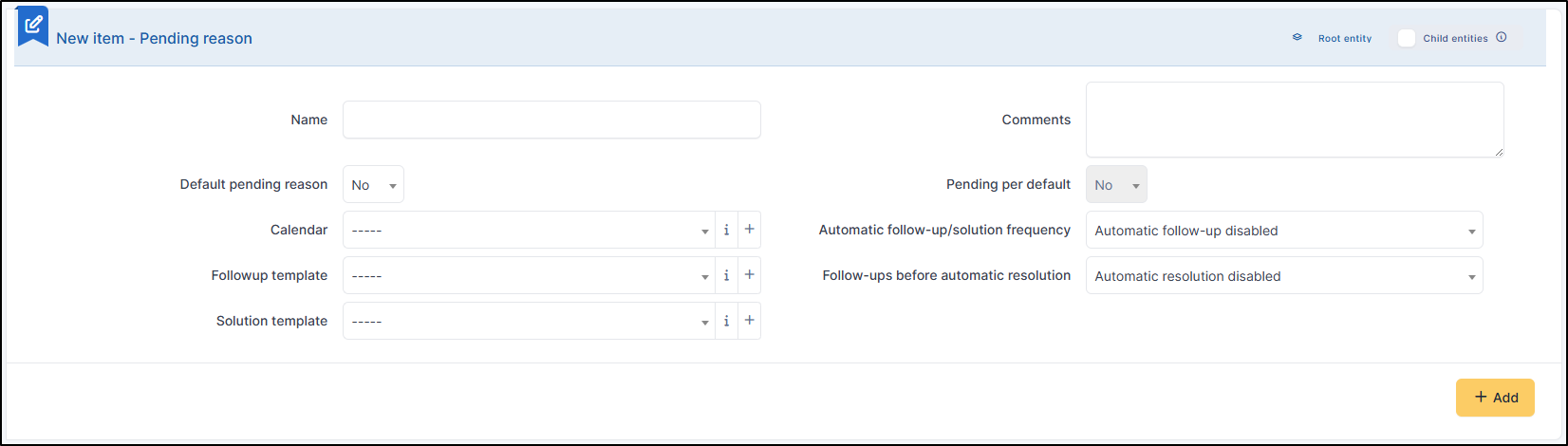
View pending resason
* **Name**: name of the pending reason (appear in dropdown-list);
* **Comments**: optional, internal note;
* **Default pending reason**: set the default pending reason**;**
* **Pending per default**: define whether it will be pre-selected when the pending reason is activated;
* **Calendar**: select a calendar so that reminders are sent in line with the company's working hours;
* **Automatic follow-up / solution frequency**: disable or select the [frequency ](#user-content-fn-1)[^1]desired (every
* **Followup template**: select or add an [followup ](https://help.glpi-project.org/glpi-12/assistance/tabs/followup.md)template;
* **Follow-ups before automatic resolution**: disable or or choose the [number of follow-ups](#user-content-fn-2)[^2] before closing;
* **Solution template**: select or add a [solution ](https://help.glpi-project.org/glpi-12/assistance/tabs/solution.md)template;
## Apply a pending reason
* To apply a reason for waiting, open the relevant ticket;
* Click on answer/task/solution;
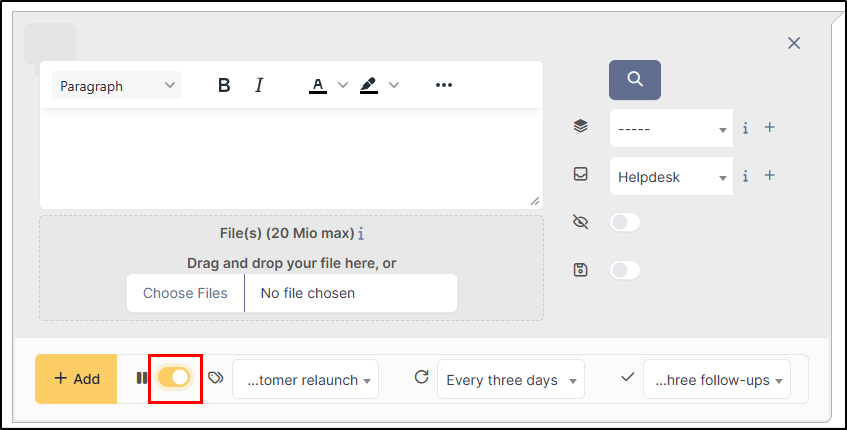
* Activate it using the button at the bottom of the answer/task/solution;
Apply pending reason
* Select a template or manually enter the information you need.
* Then click **`+ Add`**
{% hint style="success" %}
After the user has responded to the last follow-up, the reason for waiting is cancelled. If necessary, it will need to be applied during the next follow-up.
{% endhint %}
{% hint style="warning" icon="bell" %}
In order to have your follow-ups sent, you must enable the **Automatic reminder** [notification](https://help.glpi-project.org/glpi-12/setup/notifications.md), from the **`Setup`** > **`Notifications`** menu.
{% endhint %}
[^1]: * Every day
* Every twho days
* Every three days
* Every four days
* Every five days
* Every six days
* Every week
* Every two weeks
* Every three weeks
* Every four weeks
[^2]: * No follow-up
* After on follow-up
* After two follow-ups
* After three follow-ups
---
# Agent Instructions
This documentation is published with GitBook. GitBook is the documentation platform designed so that both humans and AI agents can read, navigate, and reason over technical content effectively. Learn more at gitbook.com.
## Querying This Documentation
If you need additional information that is not directly available in this page, you can query the documentation by asking a question.
Perform an HTTP GET request on the following URL with the `ask` and `goal` query parameters:
```
GET https://help.glpi-project.org/glpi-12/assistance/tabs/pending-reason.md?ask=&goal=
```
`ask` is the immediate question: it should be specific, self-contained, and written in natural language.
`goal` is what the user is ultimately trying to achieve, the reason they need the answer. Sharing it helps GitBook give you a better, more relevant answer. A goal is most helpful when it describes the outcome the user wants rather than restating the question. For example, with `ask=how do I create an API token`, a goal like `automate deployments from our CI pipeline` lets GitBook tailor the answer to that use case.
The response will contain a direct answer to the question and relevant excerpts and sources from the documentation.
Use this mechanism when the answer is not explicitly present in the current page, you need clarification or additional context, or you want to retrieve related documentation sections.