> For the complete documentation index, see [llms.txt](https://help.glpi-project.org/llms.txt). Markdown versions of documentation pages are available by appending `.md` to page URLs; this page is available as [Markdown](https://help.glpi-project.org/glpi-12/fr/overview/status.md).
# Statuts dans GLPI
## Statut
Les informations de statut sont fréquemment utilisées pour trier le matériel qui est mis au rebut, disponible, attribué... Il est possible de créer de nouvelles valeurs de statut spécifiques au système d'information géré par GLPI.
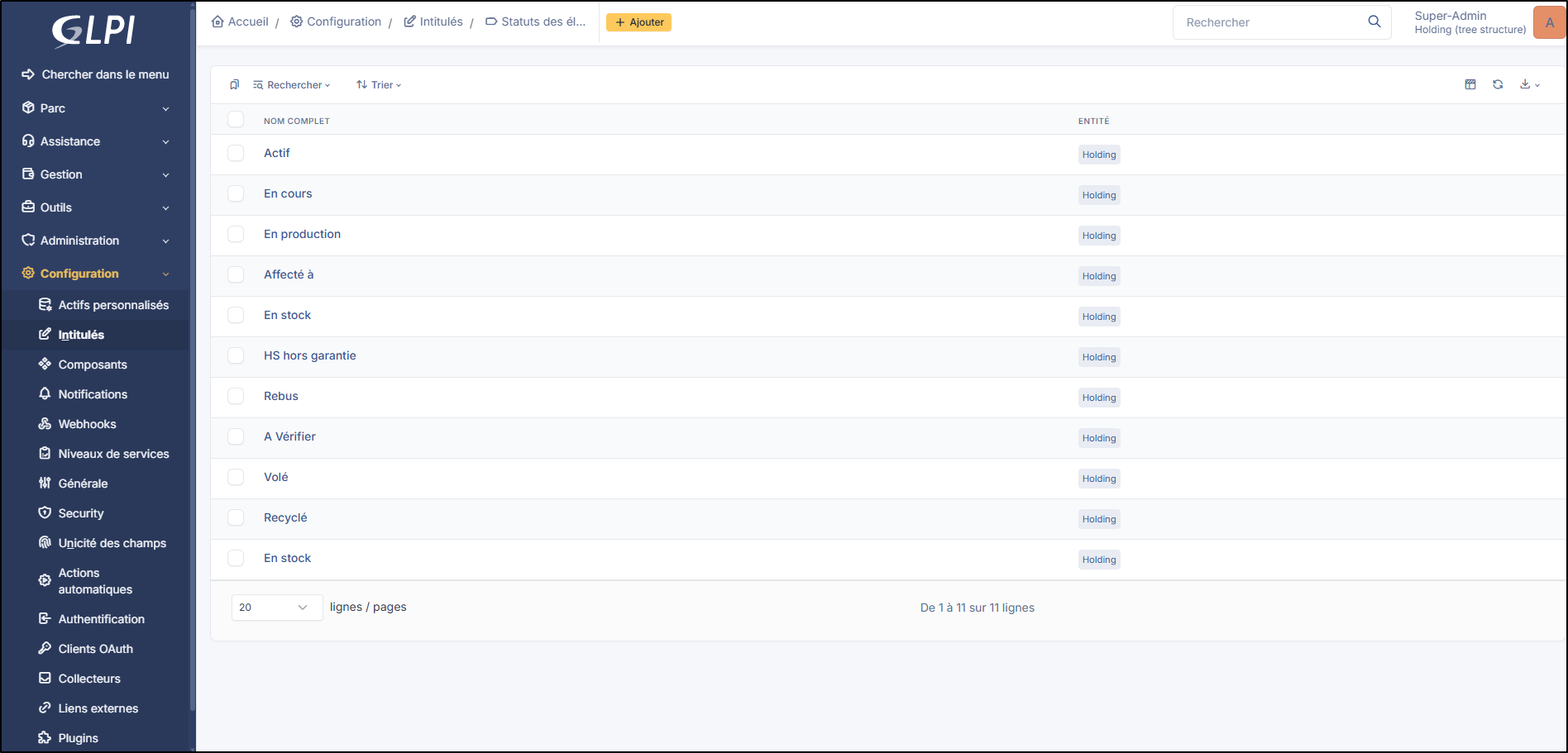
Statut des éléments
La définition de nouveaux statuts et des types d'objets pour lesquels ils seront utilisés relève de la responsabilité de l'administrateur GLPI et peuvent être créés depuis **`Configuration`** > **`Intitulés`** > **`Général`** > **`Statut des éléments`**. Ces statuts définis peuvent être récursifs, afin de faciliter la gestion.
La modification du statut d'un élément peut être effectuée soit depuis le formulaire de l'élément, soit en utilisant les actions de masse.
***
### Rapport
Un [rapport ](https://help.glpi-project.org/glpi-12/fr/tools/reports.md)peut afficher un résumé des statuts triés par types d'actifs. La[ recherche globale sur l'inventaire](https://help.glpi-project.org/glpi-12/fr/assets/global.md) permet d'interroger les éléments de l'inventaire par statut.
---
# Agent Instructions
This documentation is published with GitBook. GitBook is the documentation platform designed so that both humans and AI agents can read, navigate, and reason over technical content effectively. Learn more at gitbook.com.
## Querying This Documentation
If you need additional information that is not directly available in this page, you can query the documentation by asking a question.
Perform an HTTP GET request on the following URL with the `ask` and `goal` query parameters:
```
GET https://help.glpi-project.org/glpi-12/fr/overview/status.md?ask=&goal=
```
`ask` is the immediate question: it should be specific, self-contained, and written in natural language.
`goal` is what the user is ultimately trying to achieve, the reason they need the answer. Sharing it helps GitBook give you a better, more relevant answer. A goal is most helpful when it describes the outcome the user wants rather than restating the question. For example, with `ask=how do I create an API token`, a goal like `automate deployments from our CI pipeline` lets GitBook tailor the answer to that use case.
The response will contain a direct answer to the question and relevant excerpts and sources from the documentation.
Use this mechanism when the answer is not explicitly present in the current page, you need clarification or additional context, or you want to retrieve related documentation sections.