> For the complete documentation index, see [llms.txt](https://help.glpi-project.org/llms.txt). Markdown versions of documentation pages are available by appending `.md` to page URLs; this page is available as [Markdown](https://help.glpi-project.org/glpi-12/fr/tabs/components.md).
# Composants

{% hint style="info" %}
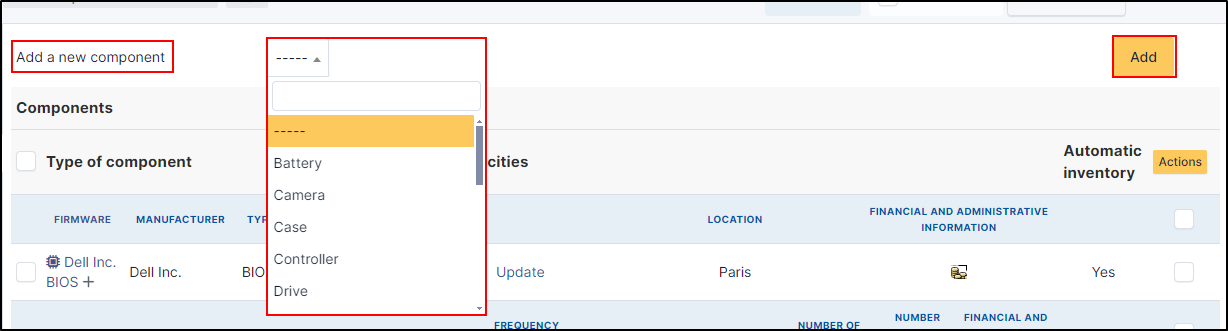
Vous pouvez ajouter n'importe quel composant en cliquant sur **Ajouter un nouveau composant** en haut de l'écran. Le composant que vous souhaitez ajouter doit déjà exister. S'il ne figure pas dans la liste, vous pouvez en ajouter de nouveaux dans [Configuration > Composants](/glpi-12/fr/setup/components.md).
{% endhint %}
## Alimentation
* Fabricant
* ATX
* Puissance
* Modèle
(Concerne les ordinateur, matériel réseau, périphérique, téléphone, châssis)
## Batterie
* Fabricant
* Type
* Capacité (MWH)
* Voltage
(Concerne les ordinateur, périphérique, imprimante, téléphone)
## Boitier
* Fabricant
* Type
* Modèle
* Lieu
(Concerne les ordinateurs)
## Caméra
* Fabricant
* Modèle
* Flash
* Lentille
* Orientation
* Distance focale
* Taille du capteur
* Support
* Résolution
* Format
(Concerne les ordinateur, téléphone)
## Capteur
* Fabricant
* Type
(Concerne les ordinateur, périphérique, téléphone)
## Carte SIM
* Fabricant
* Type
* Voltage
* Autoriser VOIP
(Concerne les ordinateur, matériel réseau, périphérique, imprimante, téléphone)
## Carte graphique
* Carte graphique
* Fabricant
* Chipset
* Mémoire par défaut (MIO)
* Interface
* Position du composant sur son bus
* Registered IDs (délivrés par PCI-SIG)
* Modèle
(Concerne les ordinateur, téléphone)
## Carte Mère
* Fabricant
* Chipset
* Modèle
(Concerne les ordianteur, téléphone)
## Carte réseau
* Fabricant
* Adresse MAC
* Débit
* Modèle
* Registered IDs (délivrés par PCI-SIG)
(Concerne les ordinateur, matériel réseau, périphérique, téléphone)
## Carte son
* Fabricant
* Type
* Registered IDs (délivrés par PCI-SIG)
* Modèle
(Concerne les ordinateur)
## Composant générique
* Fabricant
* Type
(Concerne les ordinateur, matériel réseau, périphérique, imprimante, téléphone, châssis, PDU)
## Contrôleur
* Fabricant
* RAID
* Interface
* Modèle
* Registered IDs (délivrés par PCI-SIG)
(Concerne les ordinateur, matériel réseau, périphérique, imprimante, téléphone)
## Disque dur
* Fabricant
* Capacité par défaut
* Vitesse de rotation
* Cache
* Modèle
* Interface
* Type
(Concerne les ordinateur, matériel réseau, périphérique, imprimante, téléphone)
## Firmware
* Fabricant
* Type
* Version
* Date de publication
* Version
* Modèle
(Concerne les ordinateur, matériel réseau, périphérique, imprimante, téléphone)
## Lecteur
* Fabricant
* Ecriture
* Vitesse
* Interface
* Modèle
(Concerne les ordinateur, périphérique)
## Mémoire
* Fabricant
* Type
* Fréquence (en MHz)
* Taille par défaut
* Type
* Modèle
(Concerne les ordinateur, matériel réseau, périphérique, imprimante, téléphone)
## Processeur
* Fabricant
* Fréquence par défaut (MHz)
* Fréquence (MHz)
* Numéro de série
* Nombre de cœurs
* Nombre de threads
* Modèle
(Concerne les ordinateur, téléphone)
## Périphérique PCI
* Fabricant
* Registered IDs (délivrés par PCI-SIG)
* Modèle
(Concerne les ordinateur, matériel réseau, périphérique, imprimante, téléphone, châssis, PDU)
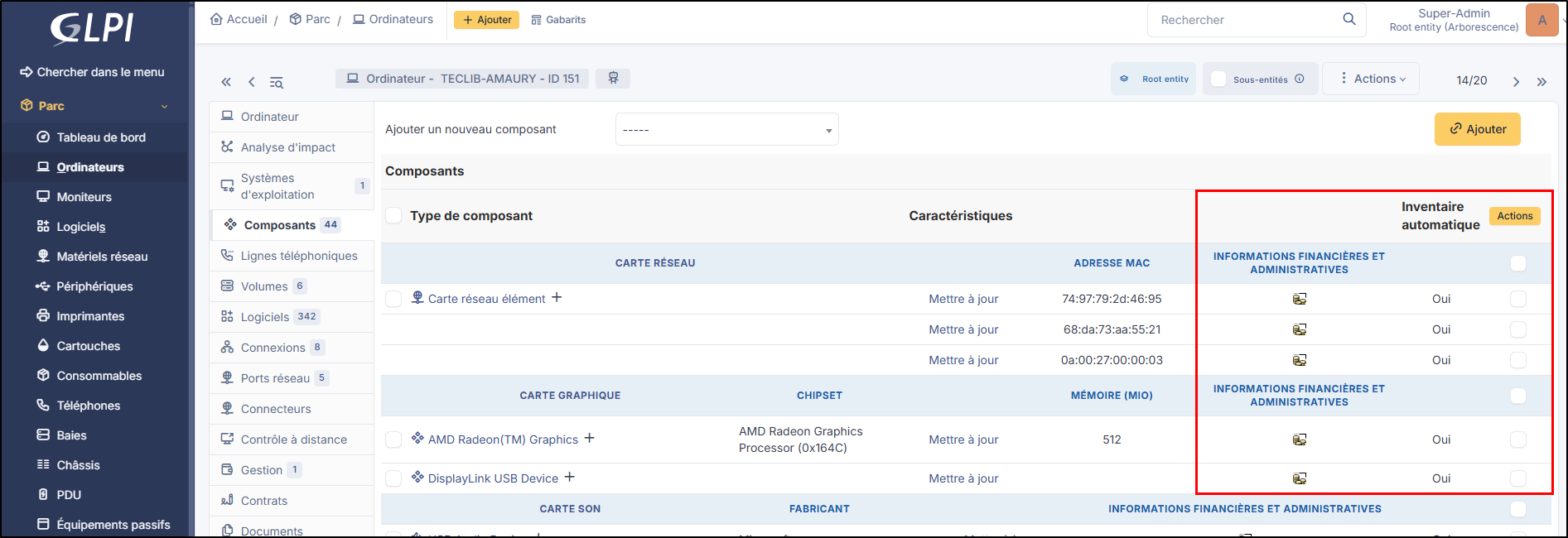
Depuis l'élément en question, GLPI vous informera sur les informations financières et administratives (si elles ont été activées dans **`Configuration`** > **`Générale`** > **`Parc`** > **`Activer les informations financières par défaut`**) ainsi que si les informations ont été remontées par l'inventaire automatique
Certains de ces composants peuvent également être liés à des projets, des tickets, des problèmes, des changements, et/ou y joindre des documents.
---
# Agent Instructions
This documentation is published with GitBook. GitBook is the documentation platform designed so that both humans and AI agents can read, navigate, and reason over technical content effectively. Learn more at gitbook.com.
## Querying This Documentation
If you need additional information that is not directly available in this page, you can query the documentation dynamically by asking a question.
Perform an HTTP GET request on the current page URL with the `ask` query parameter, and the optional `goal` query parameter:
```
GET https://help.glpi-project.org/glpi-12/fr/tabs/components.md?ask=&goal=
```
`ask` is the immediate question: it should be specific, self-contained, and written in natural language.
`goal` is optional and describes the broader end goal you are ultimately trying to accomplish on behalf of the user. GitBook uses it to tailor the answer towards what is most useful for that goal.
The response will contain a direct answer to the question and relevant excerpts and sources from the documentation.
Use this mechanism when the answer is not explicitly present in the current page, you need clarification or additional context, or you want to retrieve related documentation sections.
 {% endhint %}
## Alimentation
* Fabricant
* ATX
* Puissance
* Modèle
(Concerne les ordinateur, matériel réseau, périphérique, téléphone, châssis)
## Batterie
* Fabricant
* Type
* Capacité (MWH)
* Voltage
(Concerne les ordinateur, périphérique, imprimante, téléphone)
## Boitier
* Fabricant
* Type
* Modèle
* Lieu
(Concerne les ordinateurs)
## Caméra
* Fabricant
* Modèle
* Flash
* Lentille
* Orientation
* Distance focale
* Taille du capteur
* Support
* Résolution
* Format
(Concerne les ordinateur, téléphone)
## Capteur
* Fabricant
* Type
(Concerne les ordinateur, périphérique, téléphone)
## Carte SIM
* Fabricant
* Type
* Voltage
* Autoriser VOIP
(Concerne les ordinateur, matériel réseau, périphérique, imprimante, téléphone)
## Carte graphique
* Carte graphique
* Fabricant
* Chipset
* Mémoire par défaut (MIO)
* Interface
* Position du composant sur son bus
* Registered IDs (délivrés par PCI-SIG)
* Modèle
(Concerne les ordinateur, téléphone)
## Carte Mère
* Fabricant
* Chipset
* Modèle
(Concerne les ordianteur, téléphone)
## Carte réseau
* Fabricant
* Adresse MAC
* Débit
* Modèle
* Registered IDs (délivrés par PCI-SIG)
(Concerne les ordinateur, matériel réseau, périphérique, téléphone)
## Carte son
* Fabricant
* Type
* Registered IDs (délivrés par PCI-SIG)
* Modèle
(Concerne les ordinateur)
## Composant générique
* Fabricant
* Type
(Concerne les ordinateur, matériel réseau, périphérique, imprimante, téléphone, châssis, PDU)
## Contrôleur
* Fabricant
* RAID
* Interface
* Modèle
* Registered IDs (délivrés par PCI-SIG)
(Concerne les ordinateur, matériel réseau, périphérique, imprimante, téléphone)
## Disque dur
* Fabricant
* Capacité par défaut
* Vitesse de rotation
* Cache
* Modèle
* Interface
* Type
(Concerne les ordinateur, matériel réseau, périphérique, imprimante, téléphone)
## Firmware
* Fabricant
* Type
* Version
* Date de publication
* Version
* Modèle
(Concerne les ordinateur, matériel réseau, périphérique, imprimante, téléphone)
## Lecteur
* Fabricant
* Ecriture
* Vitesse
* Interface
* Modèle
(Concerne les ordinateur, périphérique)
## Mémoire
* Fabricant
* Type
* Fréquence (en MHz)
* Taille par défaut
* Type
* Modèle
(Concerne les ordinateur, matériel réseau, périphérique, imprimante, téléphone)
## Processeur
* Fabricant
* Fréquence par défaut (MHz)
* Fréquence (MHz)
* Numéro de série
* Nombre de cœurs
* Nombre de threads
* Modèle
(Concerne les ordinateur, téléphone)
## Périphérique PCI
* Fabricant
* Registered IDs (délivrés par PCI-SIG)
* Modèle
(Concerne les ordinateur, matériel réseau, périphérique, imprimante, téléphone, châssis, PDU)
Depuis l'élément en question, GLPI vous informera sur les informations financières et administratives (si elles ont été activées dans **`Configuration`** > **`Générale`** > **`Parc`** > **`Activer les informations financières par défaut`**) ainsi que si les informations ont été remontées par l'inventaire automatique
{% endhint %}
## Alimentation
* Fabricant
* ATX
* Puissance
* Modèle
(Concerne les ordinateur, matériel réseau, périphérique, téléphone, châssis)
## Batterie
* Fabricant
* Type
* Capacité (MWH)
* Voltage
(Concerne les ordinateur, périphérique, imprimante, téléphone)
## Boitier
* Fabricant
* Type
* Modèle
* Lieu
(Concerne les ordinateurs)
## Caméra
* Fabricant
* Modèle
* Flash
* Lentille
* Orientation
* Distance focale
* Taille du capteur
* Support
* Résolution
* Format
(Concerne les ordinateur, téléphone)
## Capteur
* Fabricant
* Type
(Concerne les ordinateur, périphérique, téléphone)
## Carte SIM
* Fabricant
* Type
* Voltage
* Autoriser VOIP
(Concerne les ordinateur, matériel réseau, périphérique, imprimante, téléphone)
## Carte graphique
* Carte graphique
* Fabricant
* Chipset
* Mémoire par défaut (MIO)
* Interface
* Position du composant sur son bus
* Registered IDs (délivrés par PCI-SIG)
* Modèle
(Concerne les ordinateur, téléphone)
## Carte Mère
* Fabricant
* Chipset
* Modèle
(Concerne les ordianteur, téléphone)
## Carte réseau
* Fabricant
* Adresse MAC
* Débit
* Modèle
* Registered IDs (délivrés par PCI-SIG)
(Concerne les ordinateur, matériel réseau, périphérique, téléphone)
## Carte son
* Fabricant
* Type
* Registered IDs (délivrés par PCI-SIG)
* Modèle
(Concerne les ordinateur)
## Composant générique
* Fabricant
* Type
(Concerne les ordinateur, matériel réseau, périphérique, imprimante, téléphone, châssis, PDU)
## Contrôleur
* Fabricant
* RAID
* Interface
* Modèle
* Registered IDs (délivrés par PCI-SIG)
(Concerne les ordinateur, matériel réseau, périphérique, imprimante, téléphone)
## Disque dur
* Fabricant
* Capacité par défaut
* Vitesse de rotation
* Cache
* Modèle
* Interface
* Type
(Concerne les ordinateur, matériel réseau, périphérique, imprimante, téléphone)
## Firmware
* Fabricant
* Type
* Version
* Date de publication
* Version
* Modèle
(Concerne les ordinateur, matériel réseau, périphérique, imprimante, téléphone)
## Lecteur
* Fabricant
* Ecriture
* Vitesse
* Interface
* Modèle
(Concerne les ordinateur, périphérique)
## Mémoire
* Fabricant
* Type
* Fréquence (en MHz)
* Taille par défaut
* Type
* Modèle
(Concerne les ordinateur, matériel réseau, périphérique, imprimante, téléphone)
## Processeur
* Fabricant
* Fréquence par défaut (MHz)
* Fréquence (MHz)
* Numéro de série
* Nombre de cœurs
* Nombre de threads
* Modèle
(Concerne les ordinateur, téléphone)
## Périphérique PCI
* Fabricant
* Registered IDs (délivrés par PCI-SIG)
* Modèle
(Concerne les ordinateur, matériel réseau, périphérique, imprimante, téléphone, châssis, PDU)
Depuis l'élément en question, GLPI vous informera sur les informations financières et administratives (si elles ont été activées dans **`Configuration`** > **`Générale`** > **`Parc`** > **`Activer les informations financières par défaut`**) ainsi que si les informations ont été remontées par l'inventaire automatique