> For the complete documentation index, see [llms.txt](https://help.glpi-project.org/llms.txt). Markdown versions of documentation pages are available by appending `.md` to page URLs; this page is available as [Markdown](https://help.glpi-project.org/glpi-12/setup/data-and-privacy.md).
# Data and Privacy
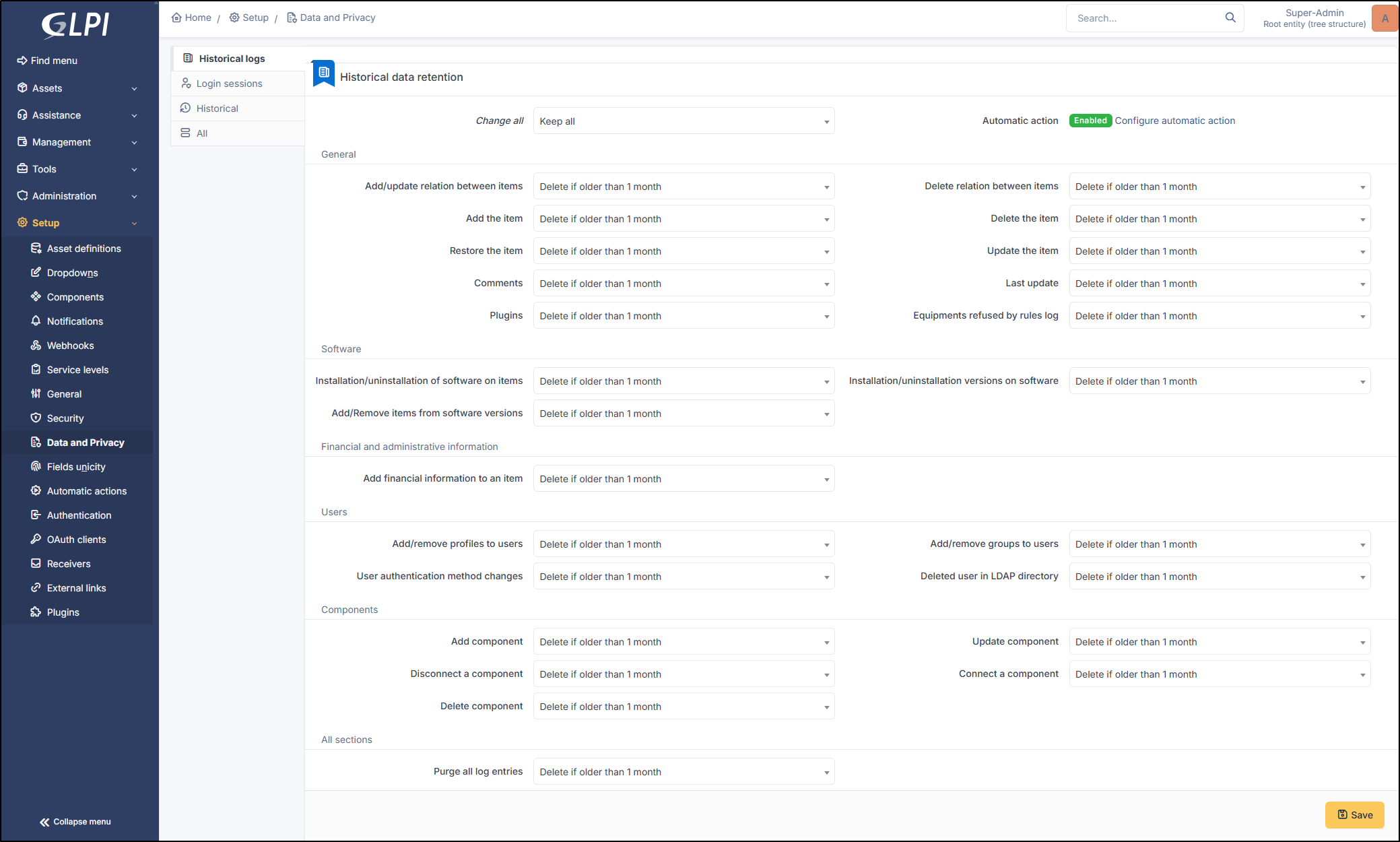
Configure how long to keep historical log entries and login session base on the type of the entry or globally.
Setup the historical logs
{% hint style="success" icon="lightbulb-on" %}
The log purge is done by the **`PurgeLogs`** automatic action.
{% endhint %}
{% hint style="info" %}
We advise you to purge your logs so as not to overload your instance and **avoid the keep** all option.
{% endhint %}
You can choose the first option **Change all** to setup all entries at once.
Each field allows you to delete, keep or delete after a certain period (between 1 and 120 months).
***
## Historical logs
### General
* **Add/update relation between items**
* **Delete relation between items**
* **Add the item**
* **Delete the item**
* **Restore the item**
* **Update the item**
* **Comments**
* **Last update**
* **Plugins** : retains or not the history of a plugin. For example, in the advanced dashboard, the history tab could be cleared.
* **Equipments refused by rules log** : Rules can be put in place to refuse equipment when an employee is working remotely, for example. This history can be cleared.
{% hint style="info" %}
An **item** is defined as anything that could be linked to a GLPI object (a contract, a document, a computer, etc.)
{% endhint %}
***
### Software
* **Installation/uninstallation of software on items**: add a new software
* **Installation/uninstallation versions on software**: adding a new version of an existing software package to a GLPI object. For example, adding version 7.4 of PowerShell to a computer that already has PowerShell installed
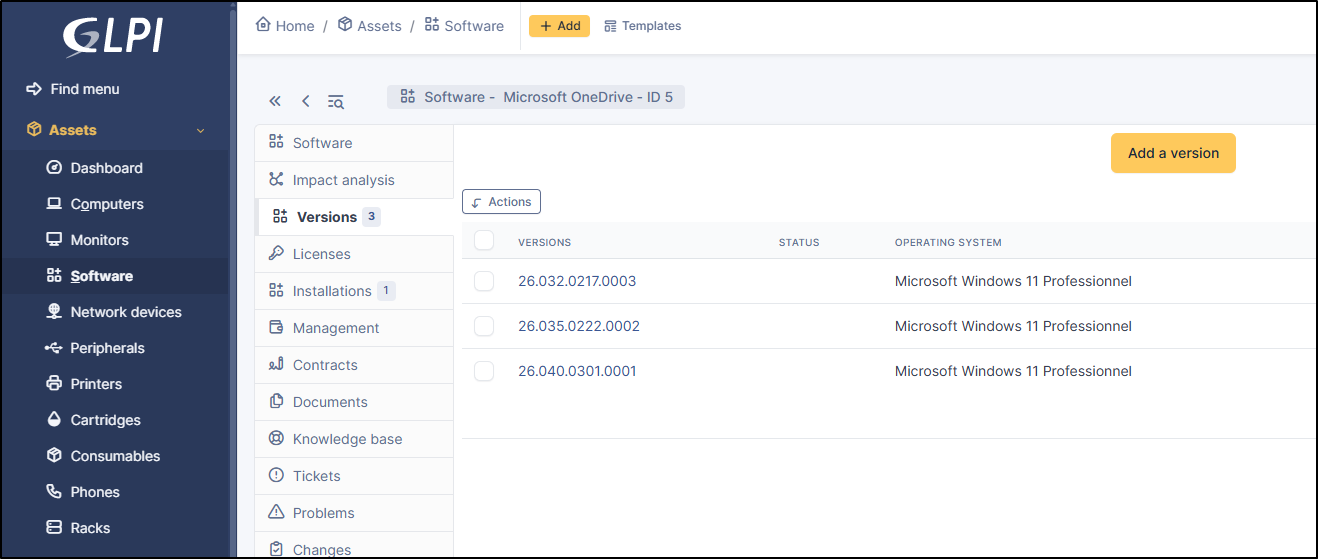
* **Add/Remove items from software versions**: This applies to **`Parc`** > **`Software`**. Multiple versions of the same software can coexist; here, we use OneDrive as an example. This option will clear the history of added versions from **`Parc`** > **`Software`** (without deleting the version itself, of course)
***
### Financial and administrative information
* Add financial information to an item
***
### Users
* Add/remove profiles to users
* Add/remove groups to users
* User authentication method changes
* Deleted user in LDAP directory
***
### Components
* **Add component**: adding a new component not currently in the database
* **Update component**: updating a component
* **Disconnect a component**: removing the connection between an existing component and another GLPI object
* **Connect a component**: connecting an existing component to a GLPI object (for example, connecting an existing PCIe port in the database to a computer)
* **Delete component**: removing a component
***
### All sections
* Purge all log entries
***
## Login sessions
### Login session data retention
* **Retention period (days)**: 90 by default
* **Action automatic**: enable the automatic action **`purgesessionhistory`** to activate the login session data retention (**`Setup`** > **`Automatic actions`**)
---
# Agent Instructions
This documentation is published with GitBook. GitBook is the documentation platform designed so that both humans and AI agents can read, navigate, and reason over technical content effectively. Learn more at gitbook.com.
## Querying This Documentation
If you need additional information that is not directly available in this page, you can query the documentation by asking a question.
Perform an HTTP GET request on the following URL with the `ask` and `goal` query parameters:
```
GET https://help.glpi-project.org/glpi-12/setup/data-and-privacy.md?ask=&goal=
```
`ask` is the immediate question: it should be specific, self-contained, and written in natural language.
`goal` is what the user is ultimately trying to achieve, the reason they need the answer. Sharing it helps GitBook give you a better, more relevant answer. A goal is most helpful when it describes the outcome the user wants rather than restating the question. For example, with `ask=how do I create an API token`, a goal like `automate deployments from our CI pipeline` lets GitBook tailor the answer to that use case.
The response will contain a direct answer to the question and relevant excerpts and sources from the documentation.
Use this mechanism when the answer is not explicitly present in the current page, you need clarification or additional context, or you want to retrieve related documentation sections.