> For the complete documentation index, see [llms.txt](https://help.glpi-project.org/llms.txt). Markdown versions of documentation pages are available by appending `.md` to page URLs; this page is available as [Markdown](https://help.glpi-project.org/glpi-12/setup/general/assets.md).
# Assets
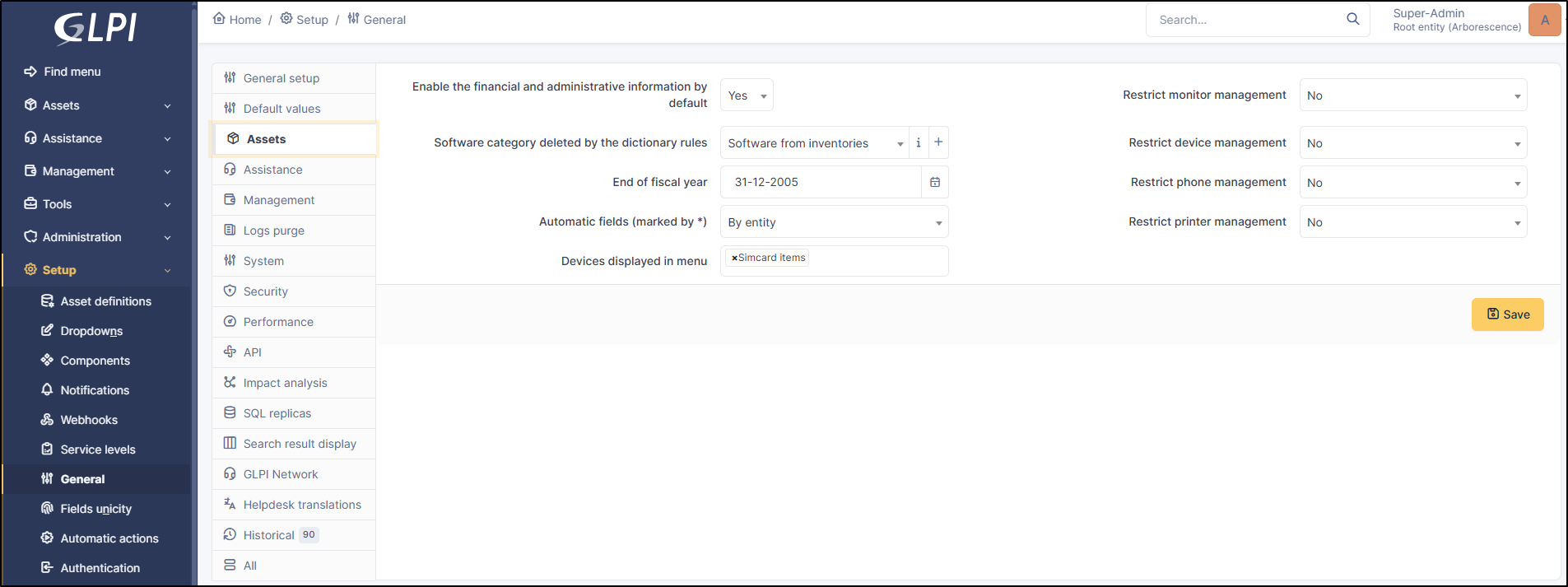
This tab allows you to configure global settings for the asset inventory.
Basic onfiguration of assets
## Basic configuration
* **Enable financial and administrative information by default**: applicable to all inventory objects
* **Software category deleted by dictionary rules**: It is possible to automatically change the category of software deleted by dictionary rules. By default, they are automatically moved to the FUSION category.
* **End of fiscal year**: Used in the Management section
* **Automatic fields (marked with\*)**: When creating a template, it is possible to add fields generated automatically from a template. For example, the asset name or inventory number. The values of these fields can be incremented either by entity or globally.
* **Devices displayed in menu**: allows you to add components to the Assets menu:
List of available components:
* Network card element
* Graphics card element
* Sound card element
* PCI device elements
* Camera element
* Battery element
* Power supply element
* Motherboard element
* Firmware element
* Processor element
* Controller element
* Chassis element
* Generic component element
* SIM card element
* Sensor element
* Memory element
* Hard drive element
* **Restrict monitor management**
* **Restrict device management**
* **Restrict phone management**
* **Restrict printer management**: When manually creating a device, the user is prompted to choose the management type (unit or global). Global management imports an element only once, unlike unit management which imports it as many times as it is used. For example, a printer shared by multiple users or a monitor connected to a screen switch. Subsequently, a unit-managed equipment can be switched to global management mode. It is possible to restrict the management type based on the equipment.
---
# Agent Instructions
This documentation is published with GitBook. GitBook is the documentation platform designed so that both humans and AI agents can read, navigate, and reason over technical content effectively. Learn more at gitbook.com.
## Querying This Documentation
If you need additional information that is not directly available in this page, you can query the documentation by asking a question.
Perform an HTTP GET request on the following URL with the `ask` and `goal` query parameters:
```
GET https://help.glpi-project.org/glpi-12/setup/general/assets.md?ask=&goal=
```
`ask` is the immediate question: it should be specific, self-contained, and written in natural language.
`goal` is what the user is ultimately trying to achieve, the reason they need the answer. Sharing it helps GitBook give you a better, more relevant answer. A goal is most helpful when it describes the outcome the user wants rather than restating the question. For example, with `ask=how do I create an API token`, a goal like `automate deployments from our CI pipeline` lets GitBook tailor the answer to that use case.
The response will contain a direct answer to the question and relevant excerpts and sources from the documentation.
Use this mechanism when the answer is not explicitly present in the current page, you need clarification or additional context, or you want to retrieve related documentation sections.