> For the complete documentation index, see [llms.txt](https://help.glpi-project.org/llms.txt). Markdown versions of documentation pages are available by appending `.md` to page URLs; this page is available as [Markdown](https://help.glpi-project.org/glpi-12/tools/knowledge-base.md).
# Knowledge base
The GLPI knowledge base has two main targets:
* Gather internal knowledge for technicians;
* Provide information in the form of a public FAQ to allow users to resolve simple problems themselves.
{% hint style="success" %}
Only articles in the public FAQ are visible to users of the simplified interface. Other items are only visible to technicians via the standard interface.
{% endhint %}
Each knowledge base article must have one or more targets, whether they are entities, groups, profiles, or users, to be readable.
As long as an article has no target, it is only visible to its author, is marked as `Not published` :eye-slash: and appears in the `Unpublished articles` .png?alt=media)table on the knowledge base homepage.
It is also possible to attach documents to knowledge base articles.
{% hint style="info" %}
* Targeting applies in the same way whether the article is in the FAQ or only in the knowledge base.
* You can publish an article for everyone by targeting the root entity. Other [permissions](file:///#autorisations) options are available.
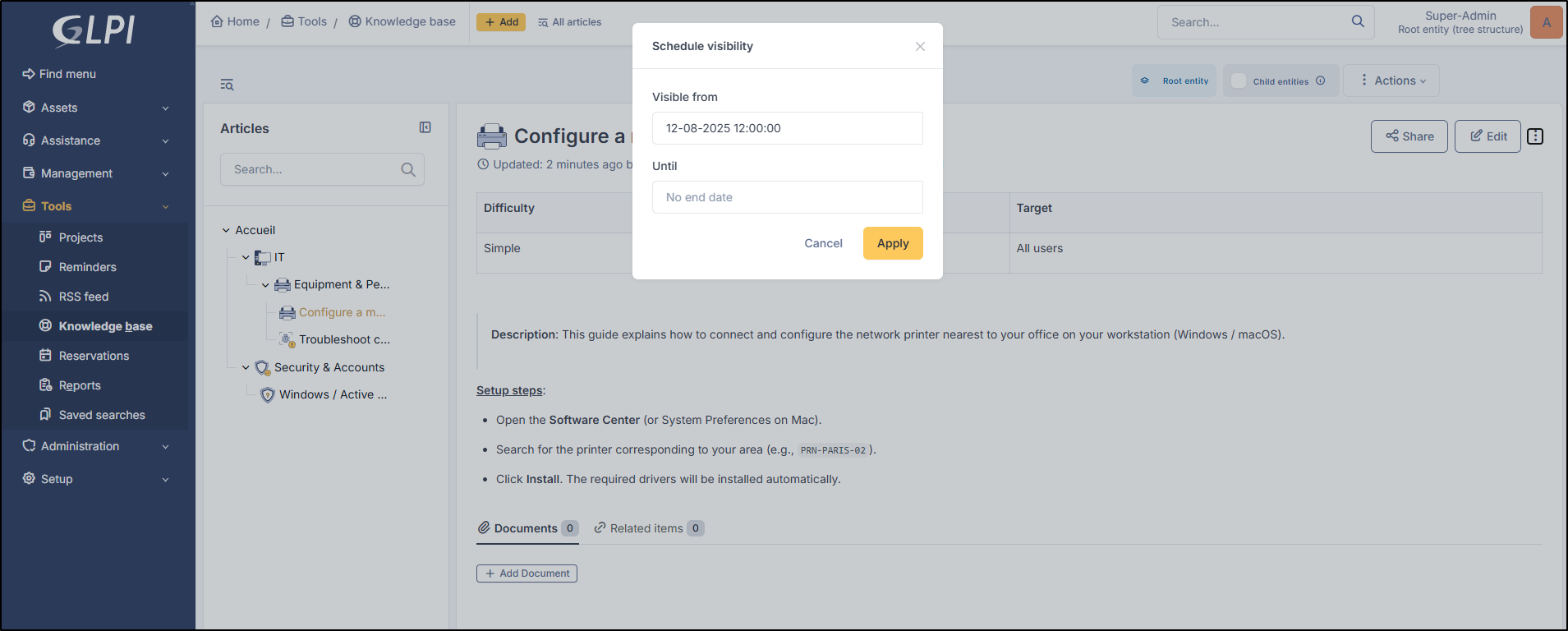
* An article can be made visible for a defined period by specifying a start and end date.
{% endhint %}
{% hint style="warning" %}
Items that should not be interpreted when displayed can be defined with the preformatted style (`
` in HTML). Tags like `` can therefore be inserted and will be displayed. Other HTML tags (`...`) may disappear during editing; to have full visibility of the text, you can switch to HTML mode where all elements will be visible. The browser may also dynamically modify content (case changes, tag additions) during editing.
{% endhint %}
***
## Article Creation
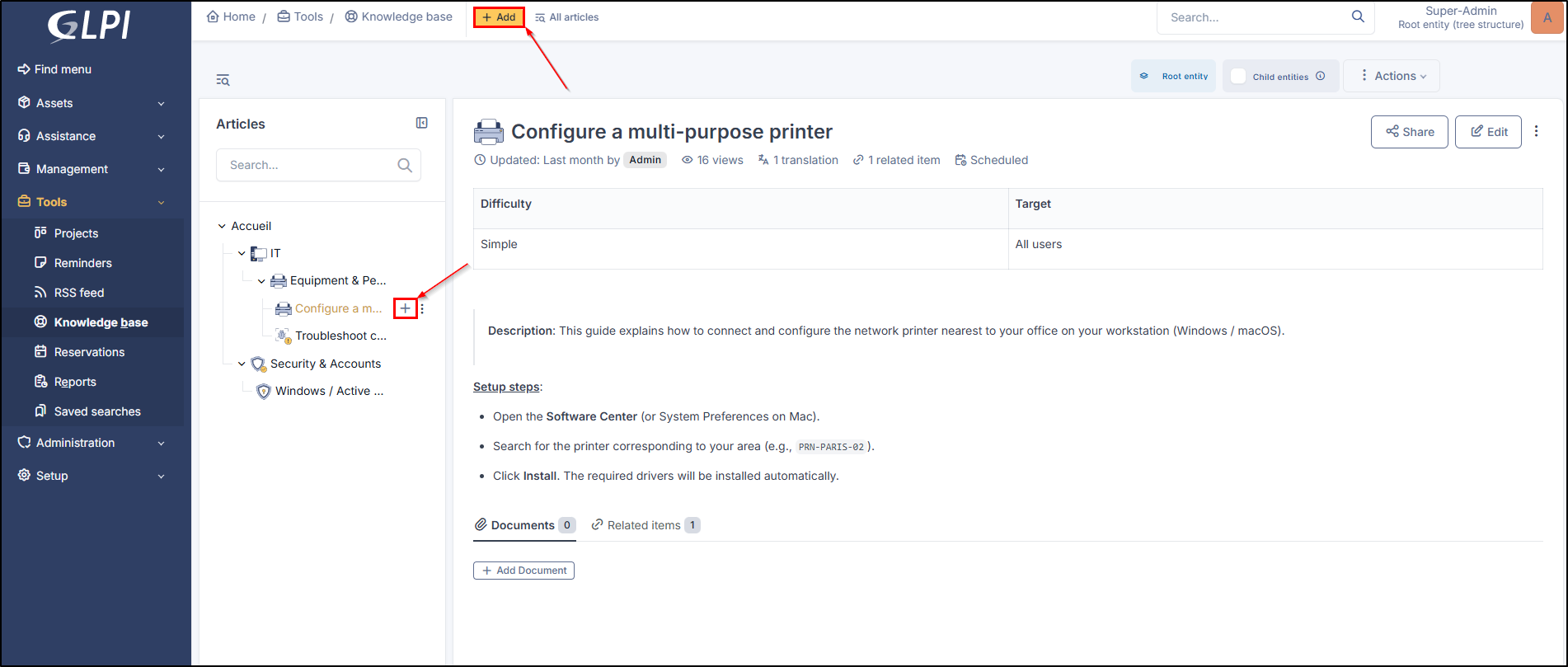
* From **`Tools`** > **`Knowledge Base`**, click **`+ Add`** at the top of the screen.
Creation of an article
On this page, you can add:
* An icon (from a predefined list or you can add your own icons)
* A title
* Content
* Translates
* A visibility-focused program
### Formatting
The **`/`** command allows you to display the different available options:
* Heading (1, 2, and 3)
* Bullet list
* Numbered list
* Quote
* Code block
* Table
* Separator
* Image
* Video
You can also format your text by highlighting the text and using the contextual toolbar:
or using shortcuts:
| Shortcut | Effect |
| -------- | --------- |
| CTRL + b | Bold |
| CTRL + i | Italic |
| CTRL + u | Underline |
| CTRL + e | Code |
### Add / Unlink a document
{% stepper %}
{% step %}
#### Add
It is possible to add a document from your computer or link an existing document.
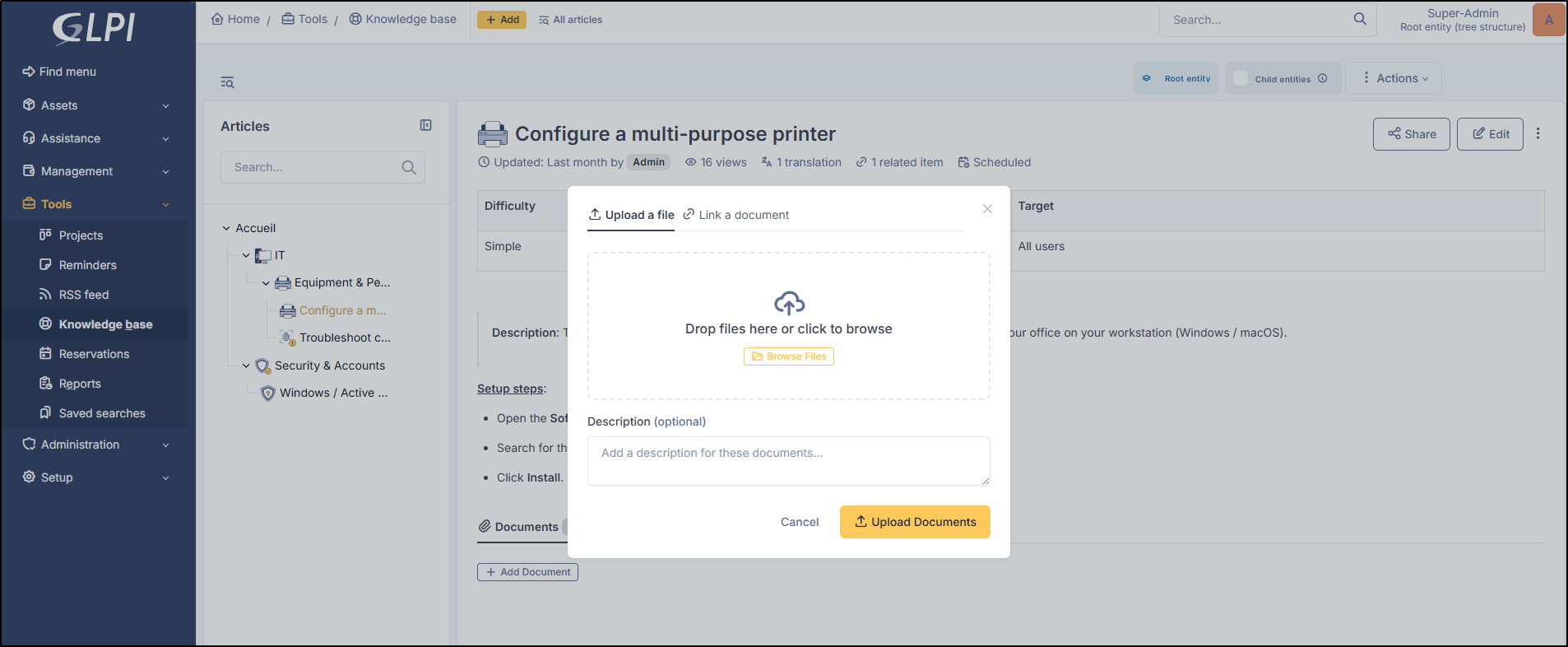
* Click **`+ Add a document`**
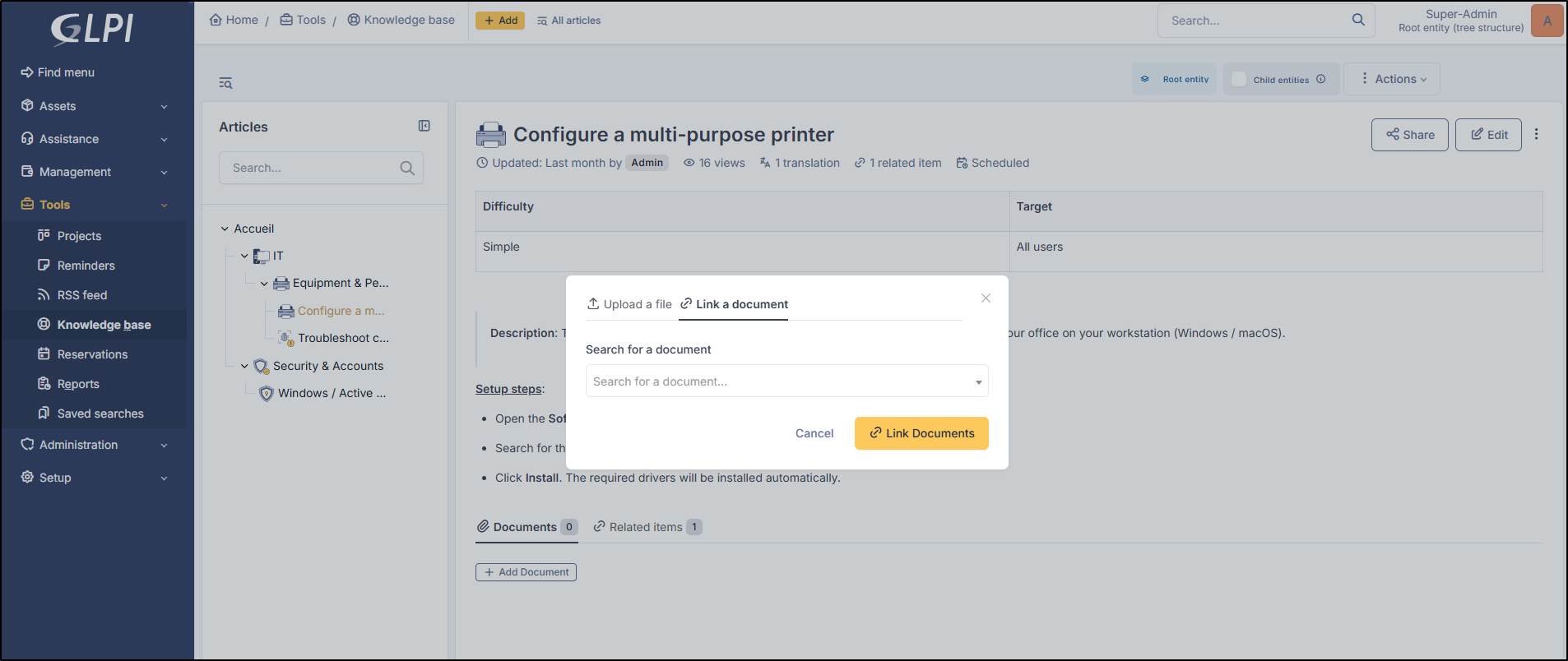
* Select **`Upload a file`** to choose one from your computer or **`Link a document`** to choose one from the document library. If you upload a document from your computer, you can add a description (optional).
Upload a document
Link an existing doc
{% endstep %}
{% step %}
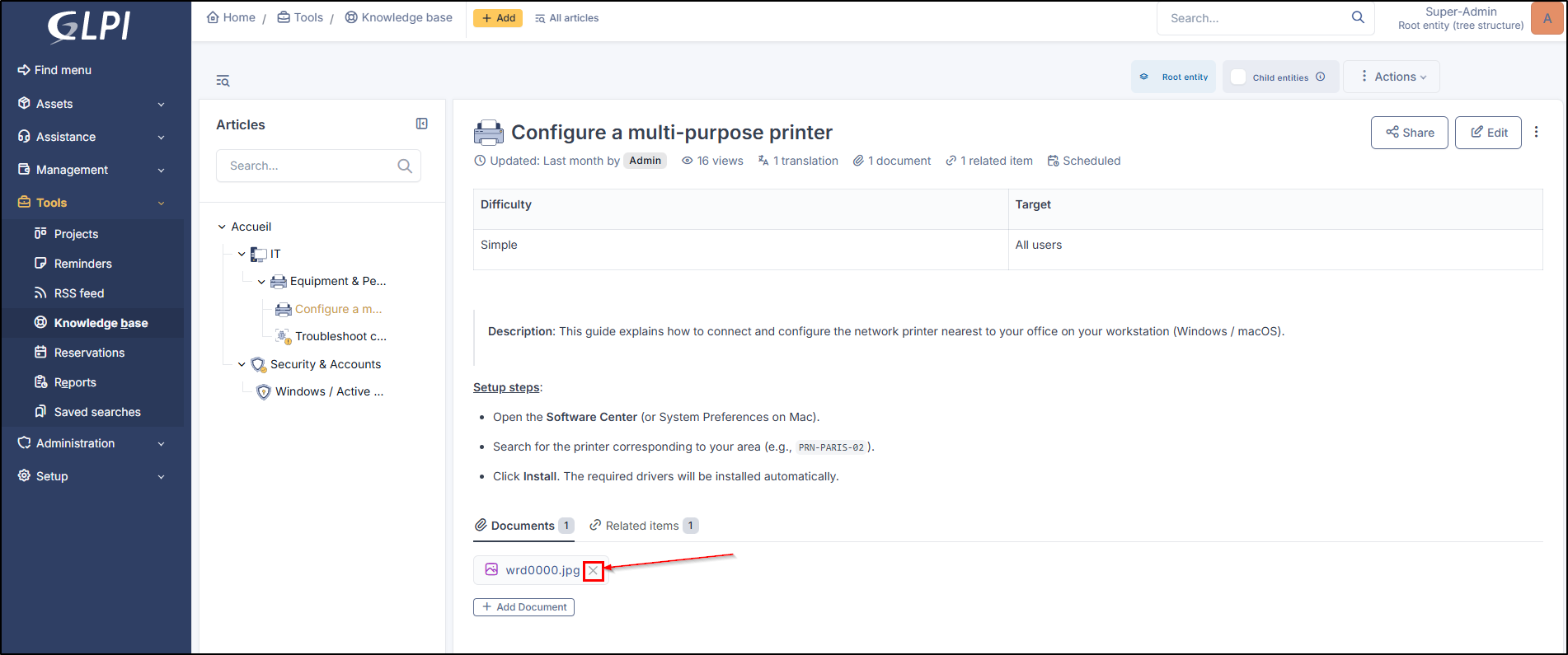
#### Unlink
* To unlink a document, click the cross next to the document in question, then click **`Unlink`**.
{% endstep %}
{% endstepper %}
### Link / Unlink an item
{% stepper %}
{% step %}
#### Link
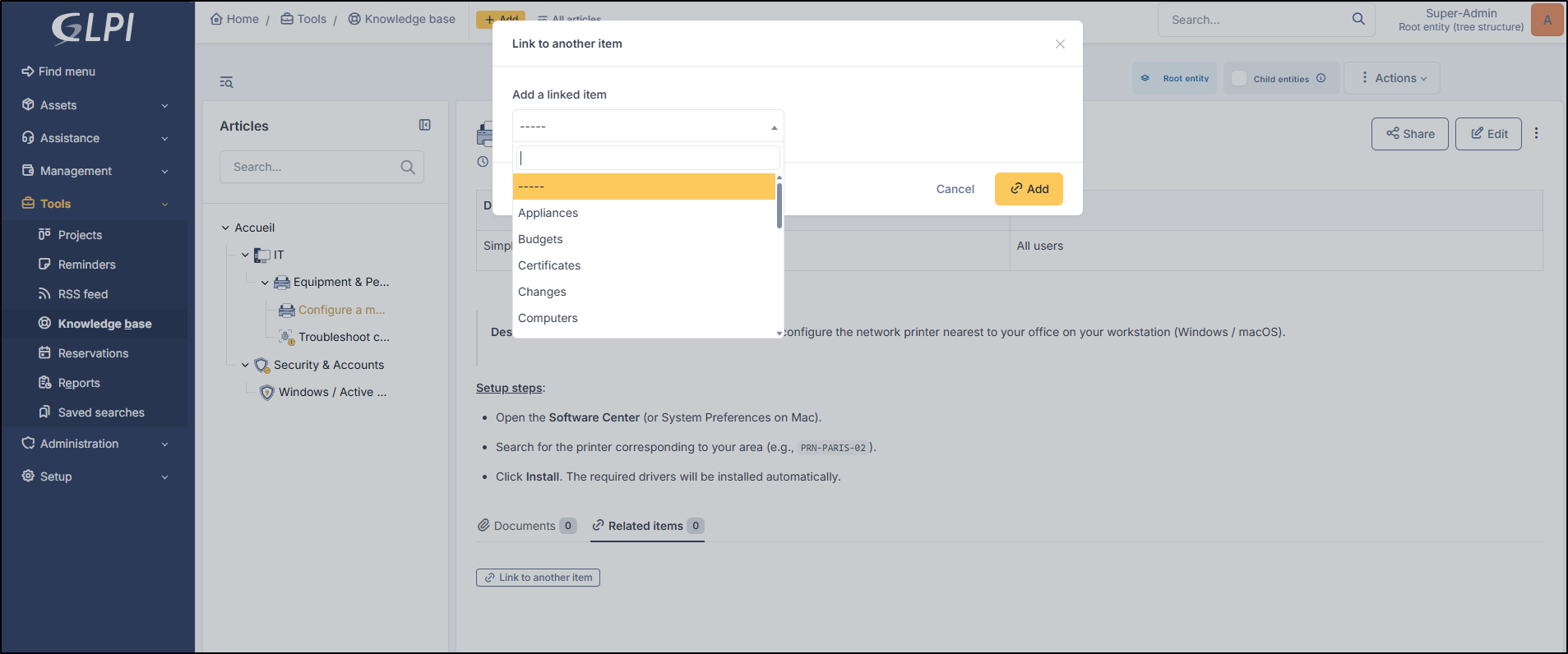
It is possible to link a GLPI item (application, computer, incident, etc.).
* Click **`Link to another`** item
* Select the desired item from the dropdown list.
{% hint style="info" %}
You can link multiple items of different types.
{% endhint %}
Link an item
{% endstep %}
{% step %}
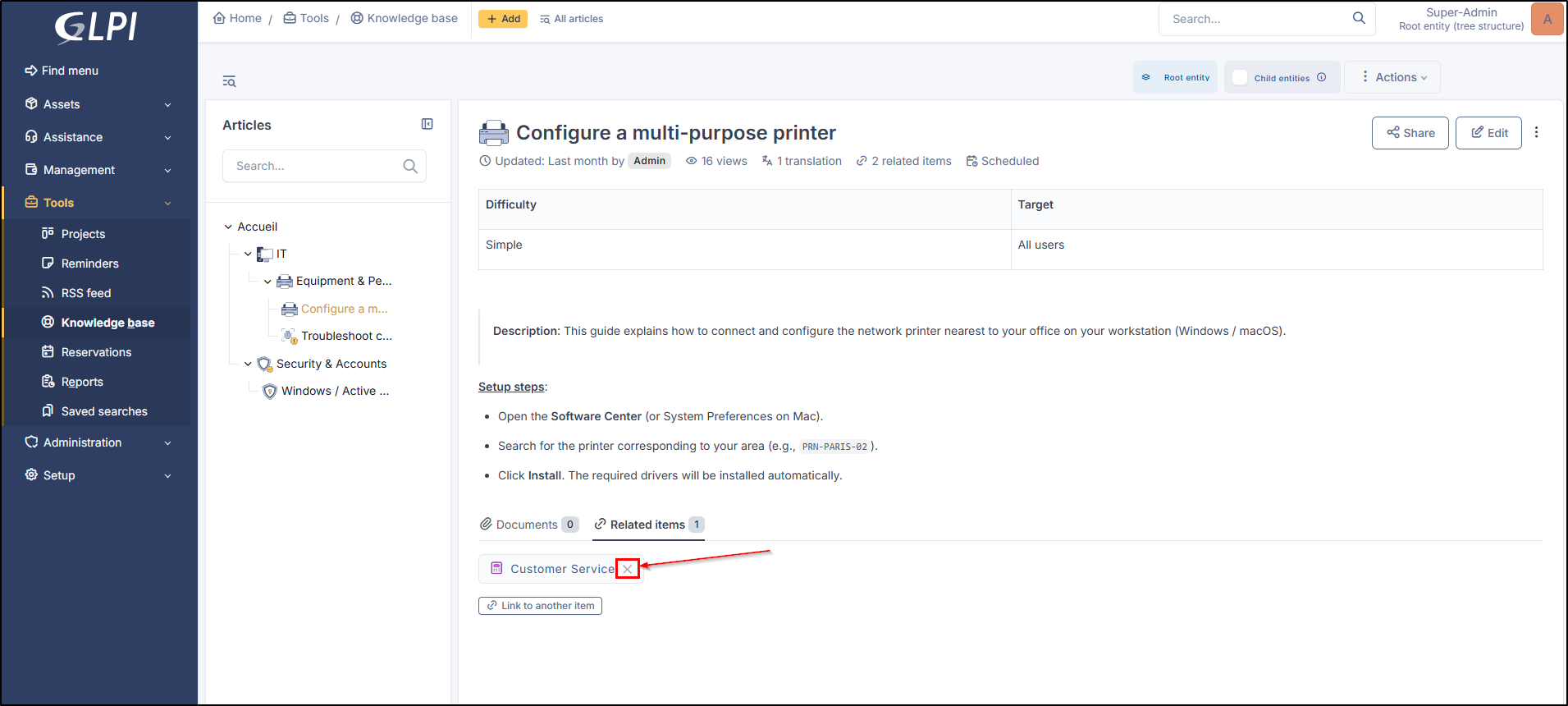
#### Unlink
* To unlink an item, click the cross next to the item in question, then click **`Unlink`**.
unlink an item
{% endstep %}
{% endstepper %}
### Add / Delete a translation
{% stepper %}
{% step %}
#### Add
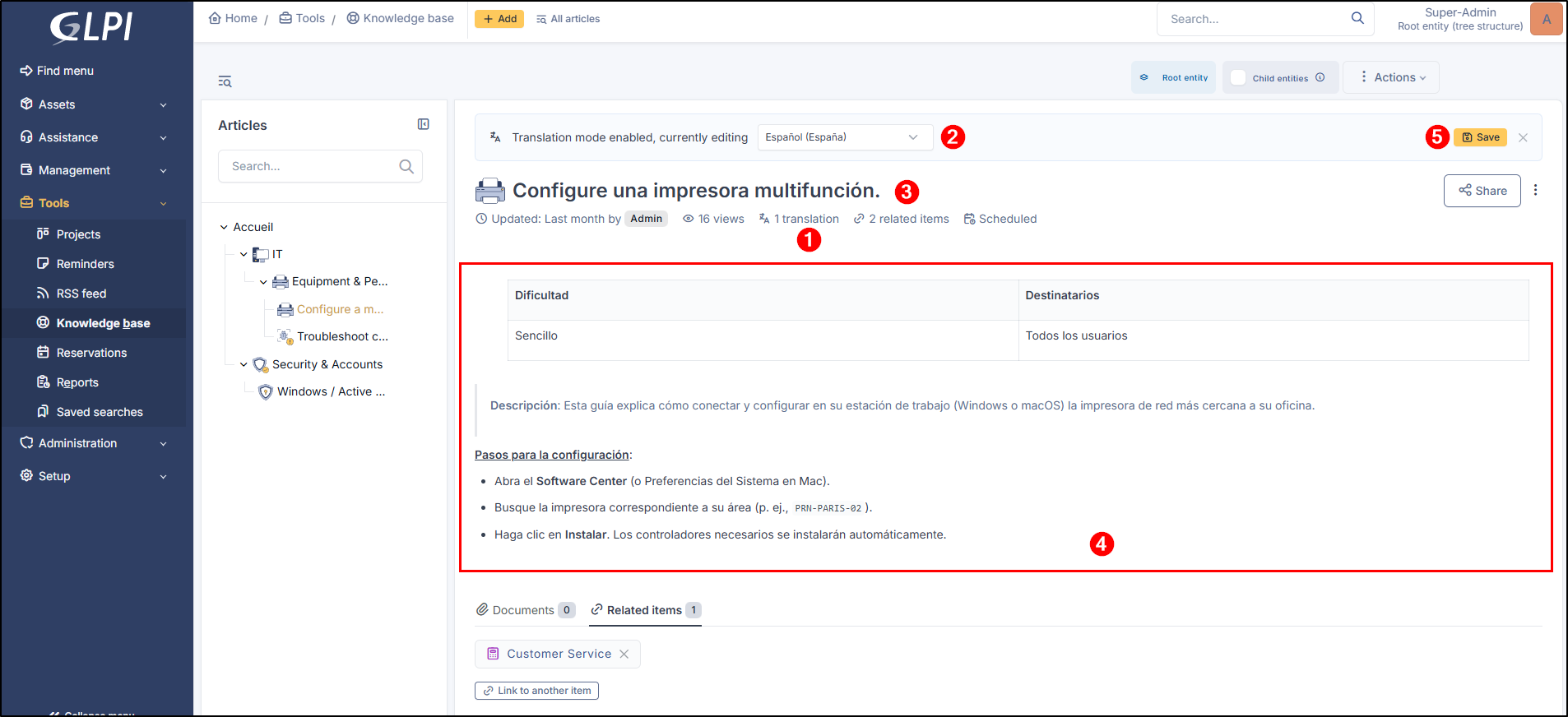
* To translate an article, click Translation below the article title.
* Select the desired language.
* Translate the title.
* Proceed with the document translation.
* Click **`Save`**.
Add a translation for an article
{% endstep %}
{% step %}
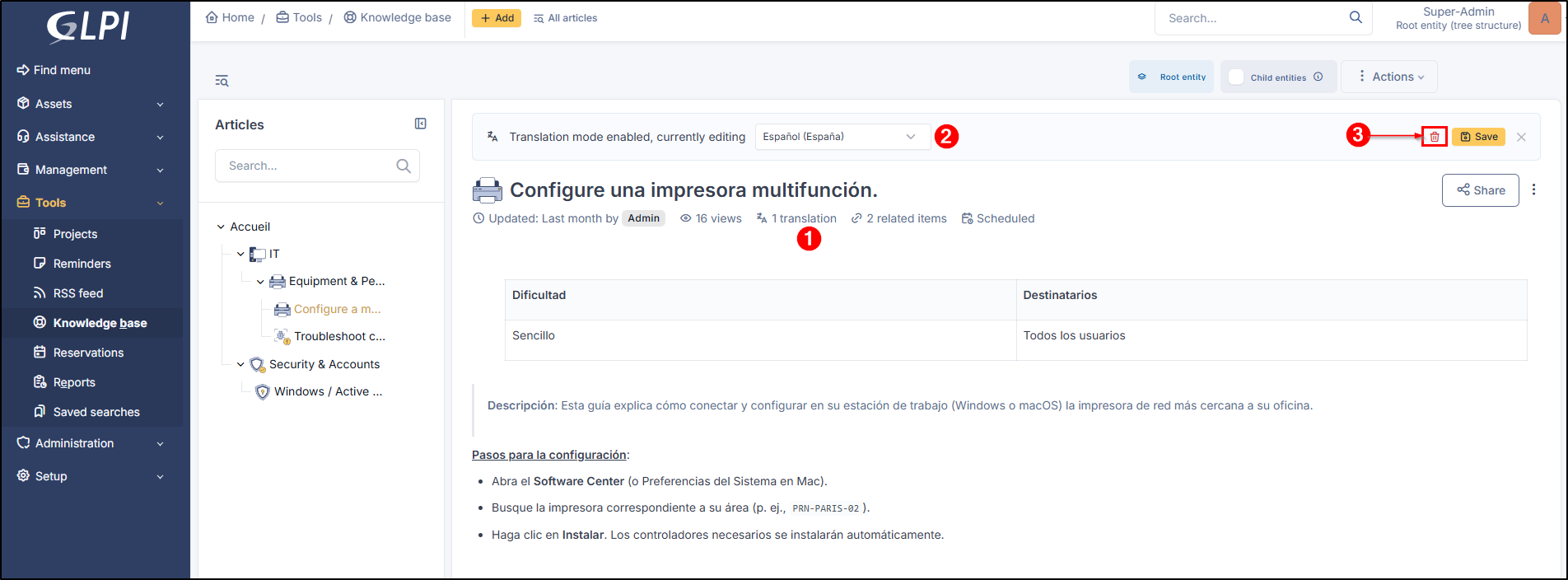
#### Delete
* To delete a translation, click Translations.
* Select the desired language.
* Click the trash can.
Delete a translation for an article
{% endstep %}
{% endstepper %}
***
## Article Management
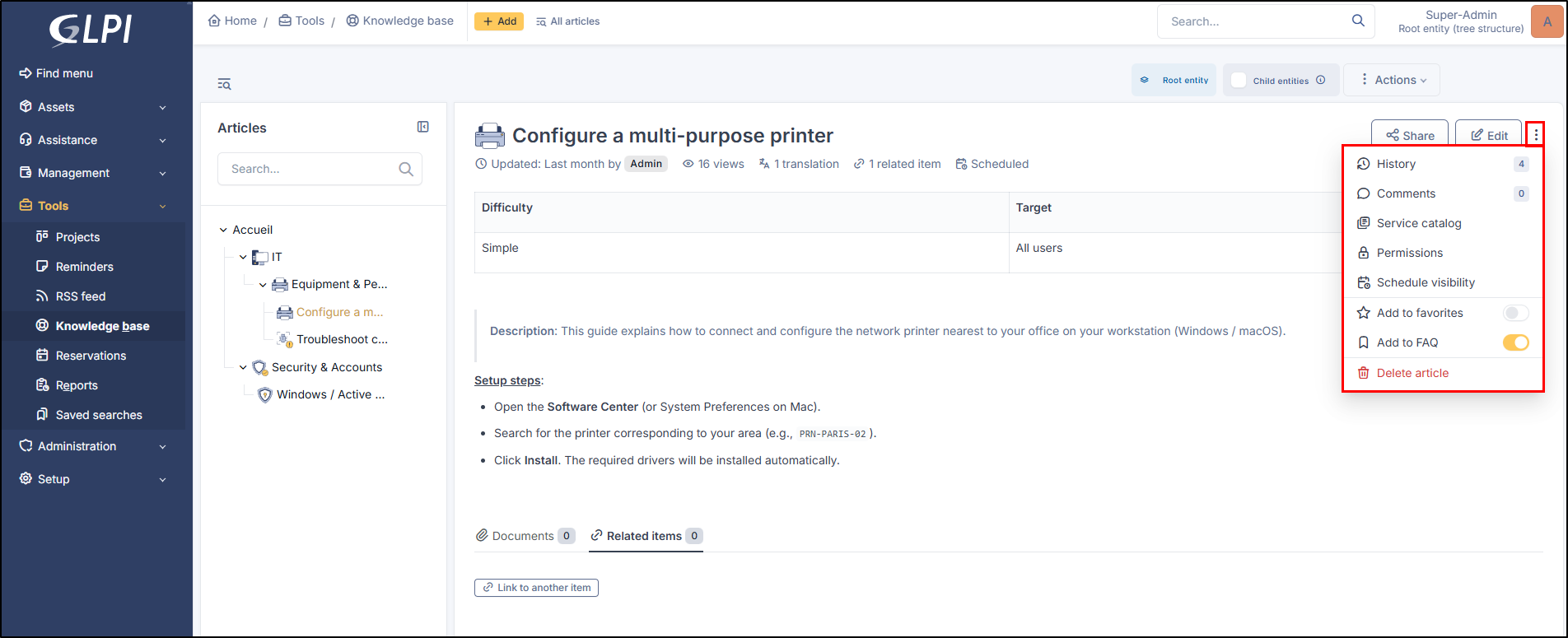
Article management is done via the article's :ellipsis-vertical: menu.
Management menu
### History and Restoration
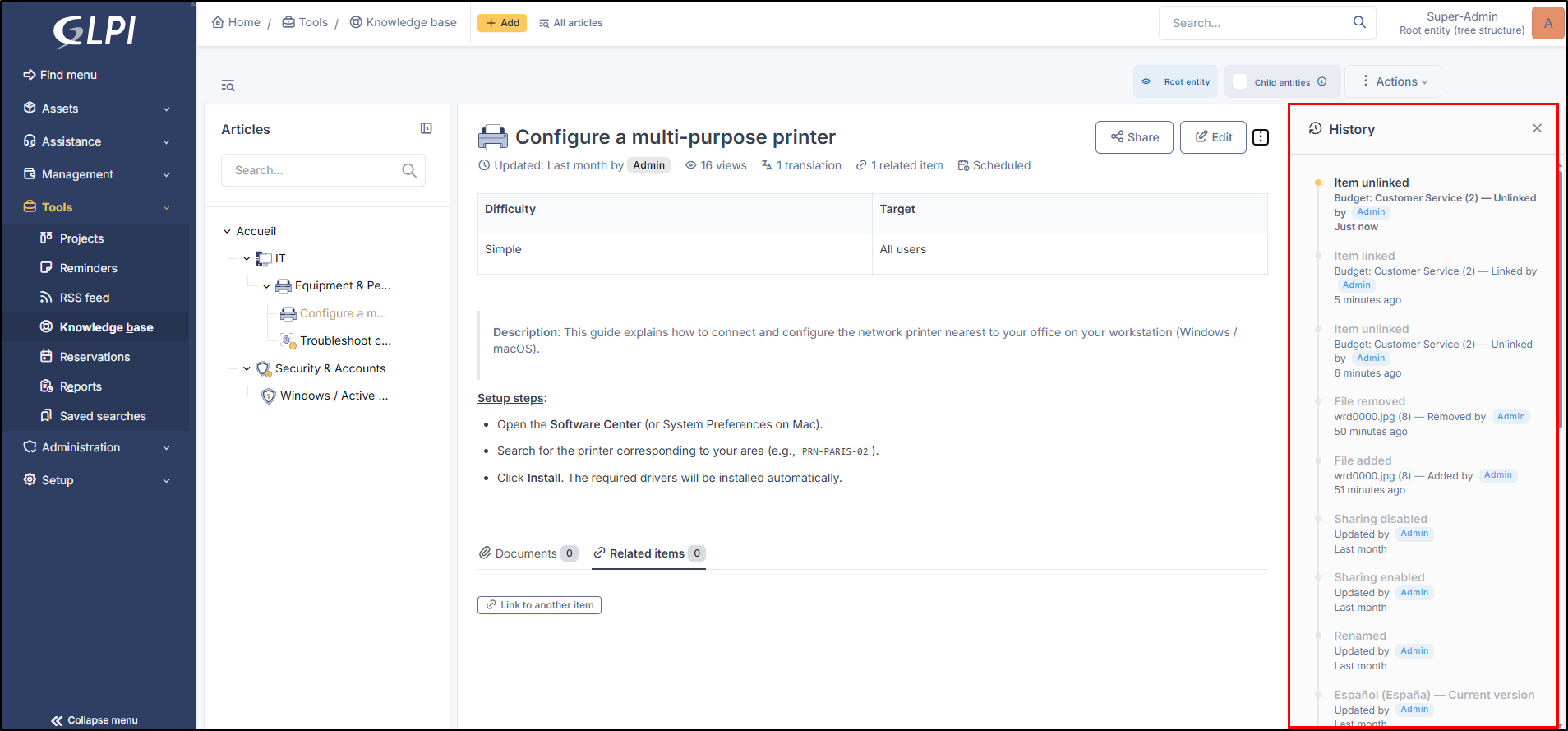
#### History
Allows you to view the modifications made by authorized users (translation, article modification, document addition, etc.).
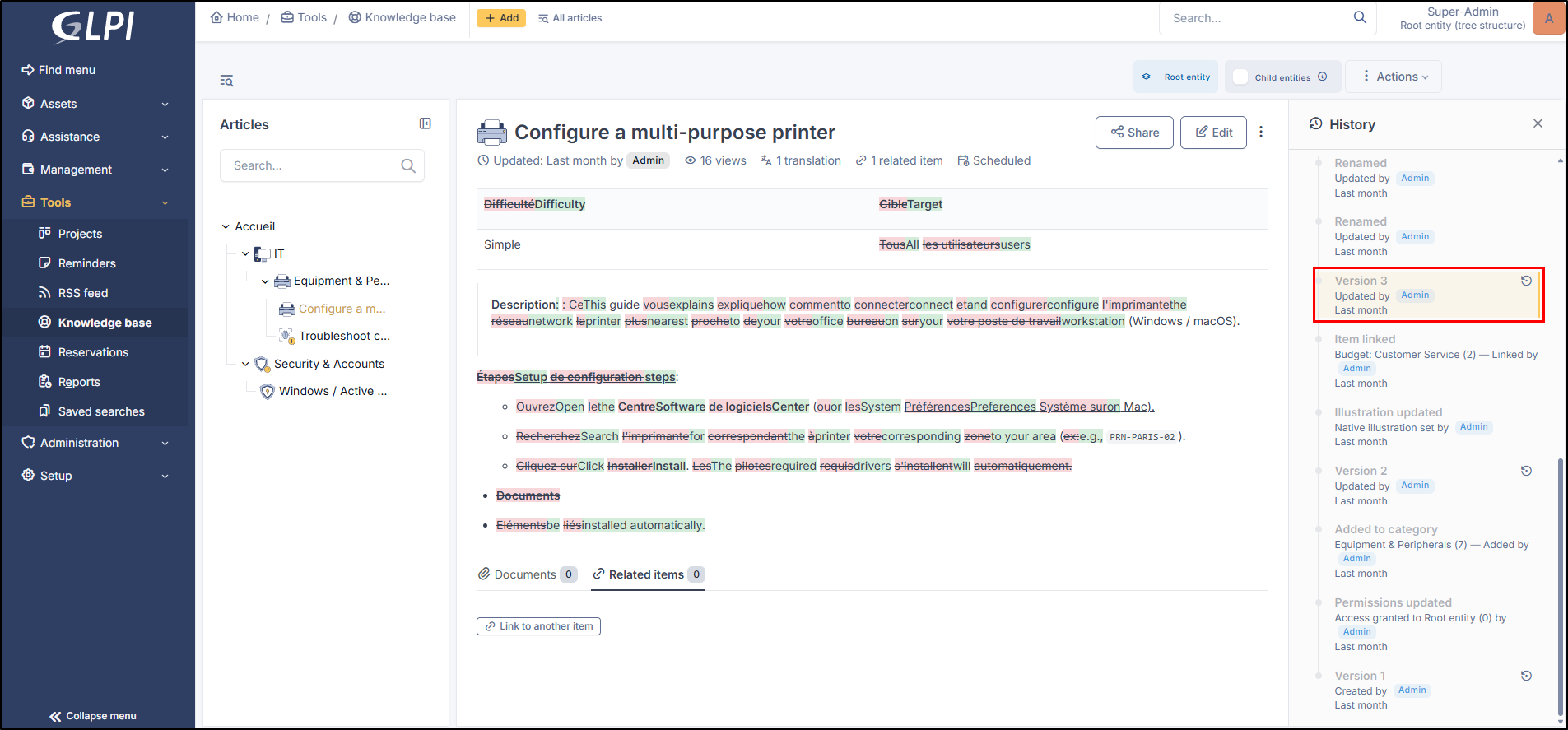
#### Restoration
From the history, you can view the content of a version that interests you. The changes made will appear on the article using color coding:
* **Green**: the **new** values
* **Red**: the **deleted** values
* **Gray**: **unchanged** values
Article restoration
You will then be able to click the restore icon to load the article with that version.
### Comments
Add comments for the desired article. This comment will be visible from the article by clicking on **Comment** under the article title.
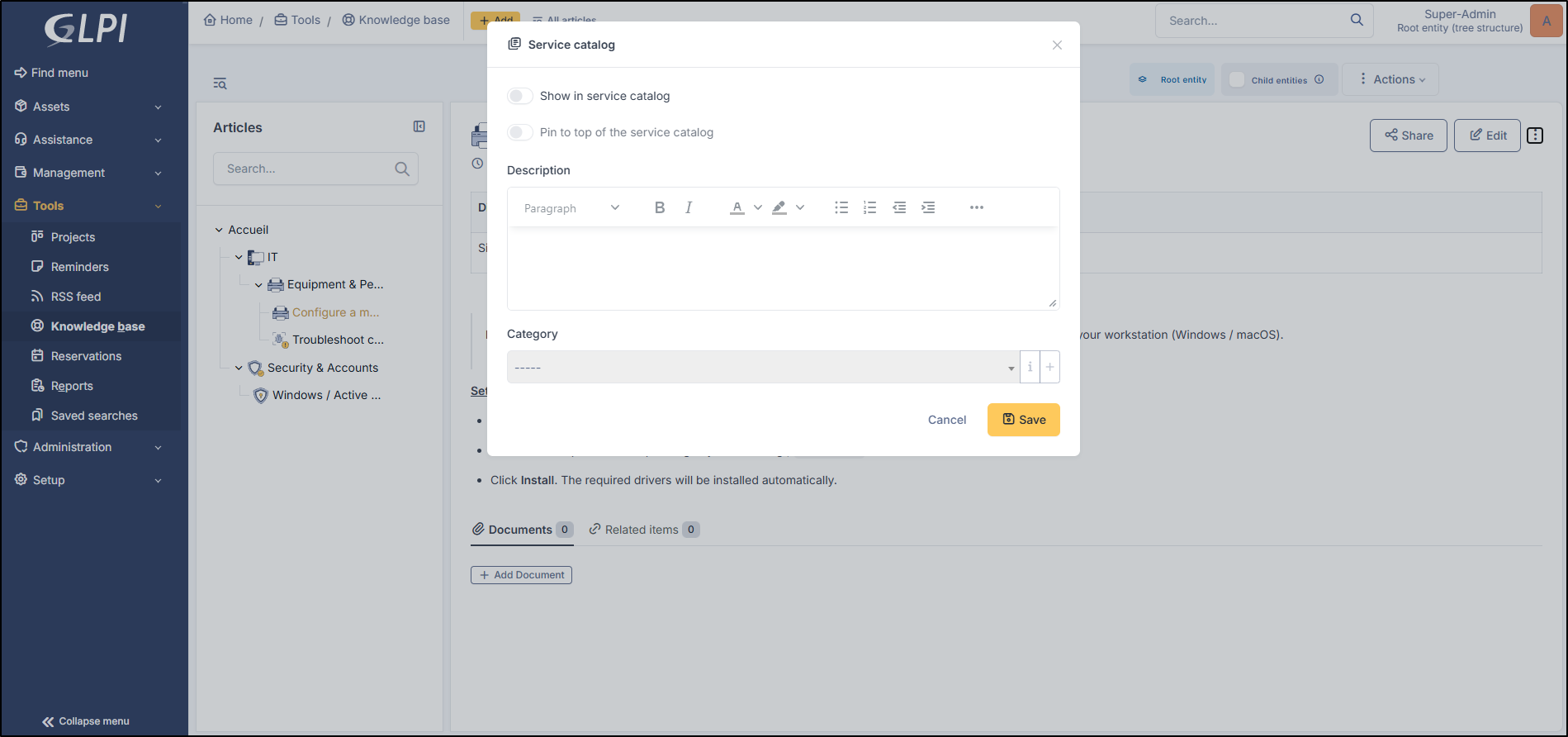
### Service Catalog
From this menu, it is possible to:
* Show this article in the service catalog
* **Pin it** to the top of the service catalog
* Display a description
* Classify this article in a **category**
Services catolog options
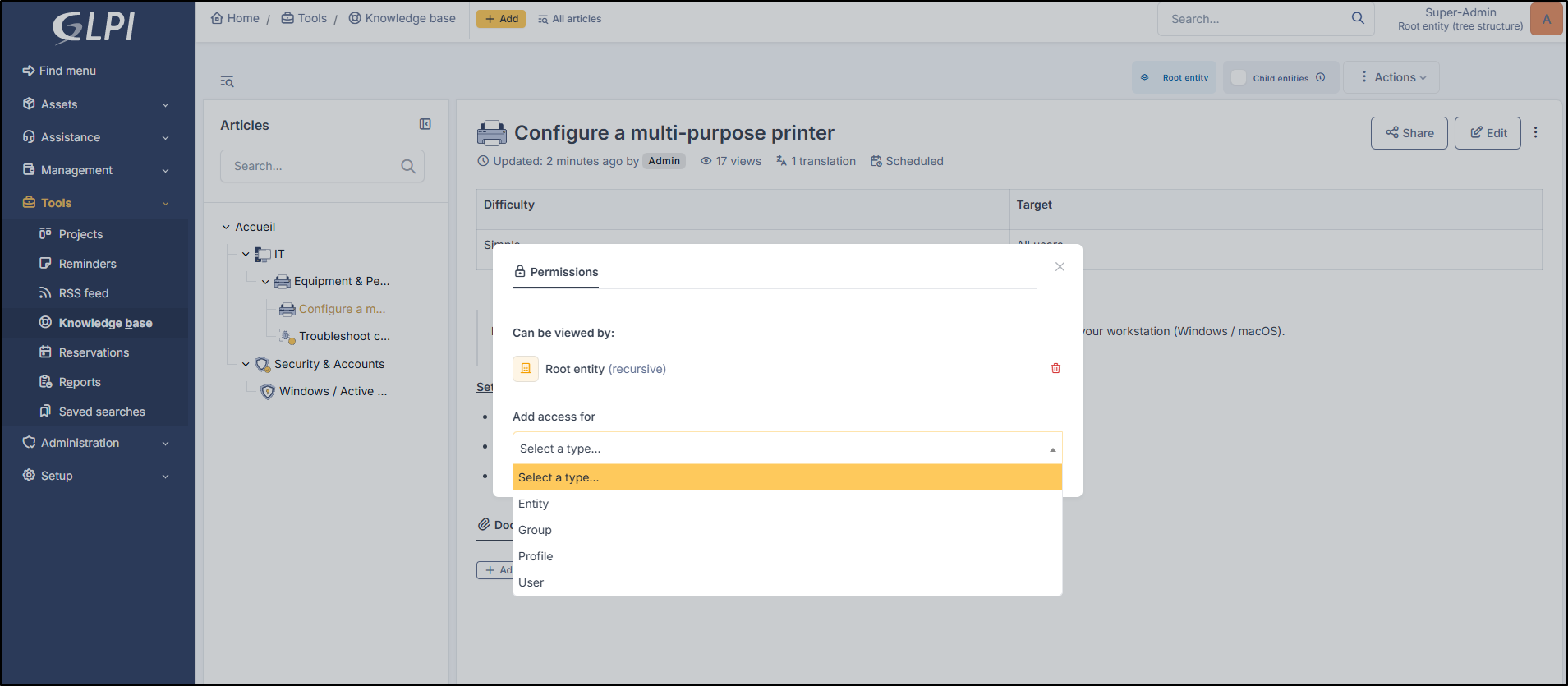
### Permissions
Permissions identify who can view the article. You can select entities, groups, profiles, or users.
Permissions
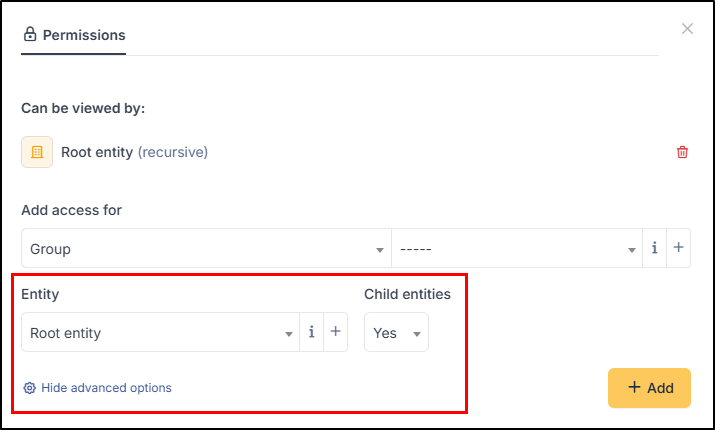
You can also display additional options for groups and profiles that will allow you to indicate the entity in which the article will be visible.
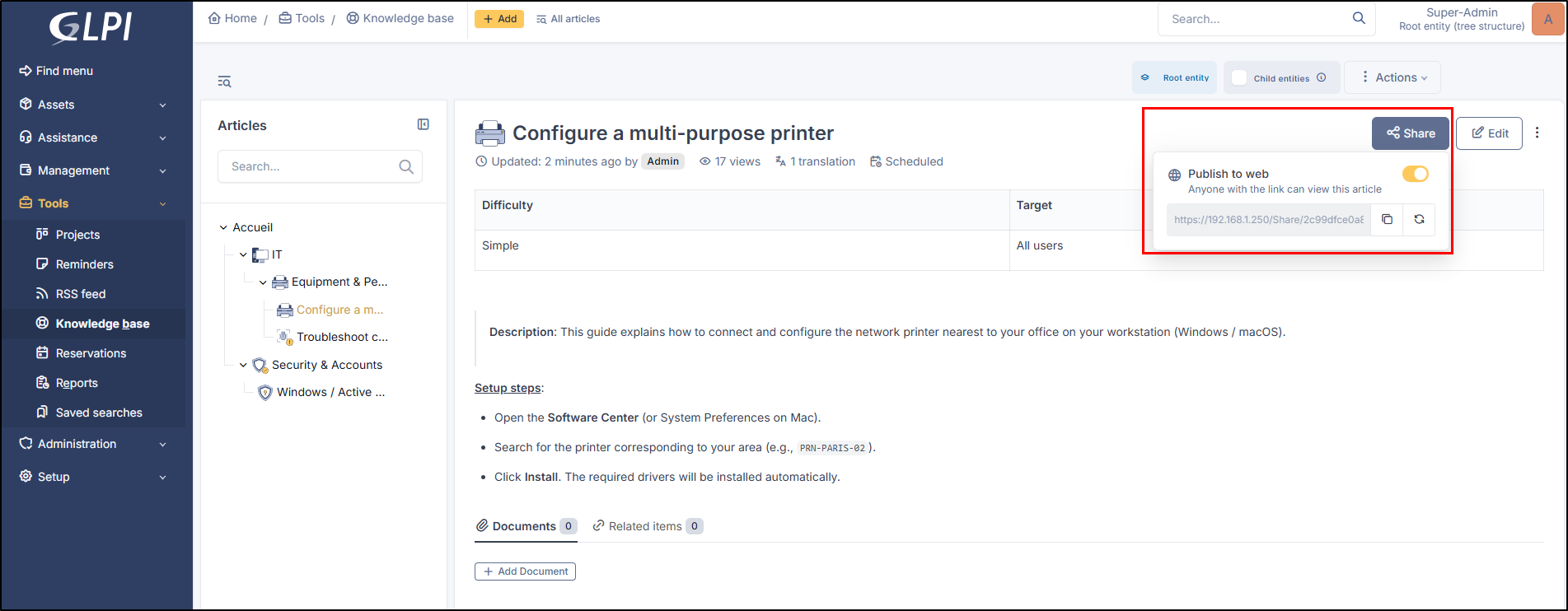
### Sharing
Sharing, on the other hand, allows you to transmit an article from the knowledge base via a public link. This link will be viewable by anyone who has the link (provided they also have access to the subnet where your GLPI instance is located. For local addresses, only users with access to the local network will be able to view the shared article. For public instances, the link will be viewable by everyone).
You can copy the link using the :copy: icon or regenerate a link using :arrows-rotate-reverse:.
Sharing an article
### Schedule Visibility
You can schedule visibility for an article by indicating start and end dates.
* If only the start date is set, the article will be visible from that date with no end limit.
* If only the end date is indicated, the article will be visible from the day of its publication until the indicated end date.
Visibility of the article
### Add to Favorites
Adding to favorites allows for quick retrieval when navigating the knowledge base.
### Add to FAQ
Adding to the FAQ allows you to add an article visible from the simplified interface.
### Delete an Article
Deleting the article results in its permanent deletion. You will not be able to undo this.
***
## Search options
The knowledge base search engine provides operators for complex search: `+ - ~ < > * ” ” ()`.
Expression
Description
+
word must be there
-
word must not be there
*
truncate suffix
" "
contained sequence must be searched literally
< >
define order on search elements
()
group when using < and >
**Examples** :
Example
Description
printer failure
Search lines containing at least one of these words
+printer +failure
Search lines containing both words
+mail thunderbird
Search lines containing word mail but rank higher lines containing also word thunderbird
+mail -outlook
Search lines containing word mail but not word outlook
+mail +(>thunderbird <outlook)
Search lines containing word mail and thunderbird, or mail and outlook, in any order, but rank mail thunderbird higher than mail outlook
open*
Search lines containing words such as openoffice, openwriter, openbar, openphp...
"openoffice suite"
Search lines containing exactly sentence openoffice suite
---
# Agent Instructions
This documentation is published with GitBook. GitBook is the documentation platform designed so that both humans and AI agents can read, navigate, and reason over technical content effectively. Learn more at gitbook.com.
## Querying This Documentation
If you need additional information that is not directly available in this page, you can query the documentation dynamically by asking a question.
Perform an HTTP GET request on the current page URL with the `ask` query parameter, and the optional `goal` query parameter:
```
GET https://help.glpi-project.org/glpi-12/tools/knowledge-base.md?ask=&goal=
```
`ask` is the immediate question: it should be specific, self-contained, and written in natural language.
`goal` is optional and describes the broader end goal you are ultimately trying to accomplish on behalf of the user. GitBook uses it to tailor the answer towards what is most useful for that goal.
The response will contain a direct answer to the question and relevant excerpts and sources from the documentation.
Use this mechanism when the answer is not explicitly present in the current page, you need clarification or additional context, or you want to retrieve related documentation sections.

 to load the article with that version.
### Comments
Add comments for the desired article. This comment will be visible from the article by clicking on **Comment** under the article title.
### Service Catalog
From this menu, it is possible to:
* Show this article in the service catalog
* **Pin it** to the top of the service catalog
* Display a description
* Classify this article in a **category**
to load the article with that version.
### Comments
Add comments for the desired article. This comment will be visible from the article by clicking on **Comment** under the article title.
### Service Catalog
From this menu, it is possible to:
* Show this article in the service catalog
* **Pin it** to the top of the service catalog
* Display a description
* Classify this article in a **category**